
To replace your Acura key fob battery, first release and remove the metal key. Pry open the fob casing gently using the metal key or a small flat-head screwdriver.
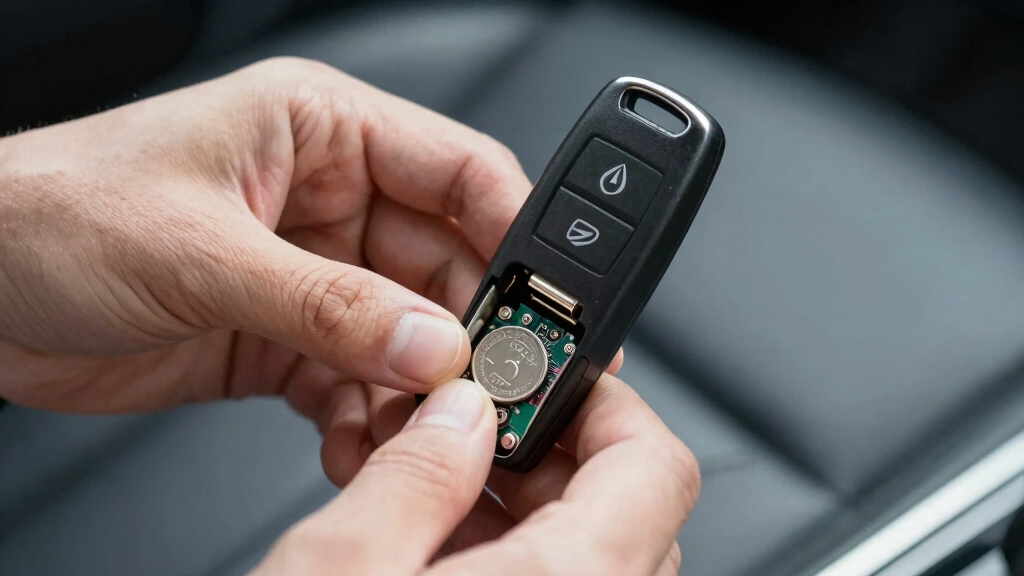
Remove the old CR2032 battery, noting the positive (+) side orientation. Insert the new CR2032 battery with the positive side facing up, ensuring it’s flat against the contacts.
Snap the casing back securely and test the fob buttons for functionality. For detailed steps and troubleshooting, keep exploring.
Key Takeaways
- Confirm your Acura key fob uses a CR2032 battery by checking the battery surface inside the fob.
- Use a small flat-head screwdriver or metal key blade to gently pry open the key fob casing.
- Remove the old CR2032 battery and insert a new one with the positive (+) side facing up and readable.
- Align and press the fob halves firmly until they click, then reinsert the metal key blade.
- Test all buttons on the key fob after reassembly to ensure proper functionality before finishing.
How to Identify Your Acura Key Fob Battery Type?
When replacing your Acura key fob battery, you’ll typically need a CR2032 lithium coin cell. This 3-volt battery is standard across most Acura models, including the Keyless Remote and Smart Key Fobs.
To confirm, open your key fob carefully and check the battery surface for the “CR2032” marking, which should be clearly readable. Note that the positive (+) side faces up during installation.
Some Acura Keyless Remotes require two CR2032 batteries, so verify your fob’s design before proceeding. These batteries are widely available from online retailers like Amazon or local stores.
Identifying the correct battery type guarantees proper function and avoids damage. Always handle the battery and fob components gently to maintain seals and prevent water ingress.
CR2032 lithium batteries provide a steady 3V output essential for sensitive electronics and are known for their high energy density and long shelf life.
Tools You’ll Need to Replace the Acura Key Fob Battery
To replace the Acura key fob battery, you’ll need just a few simple tools easily found around the house.
A small flat-head screwdriver is essential for prying open the fob’s casing without damage. The metal key blade, which you release from the fob, doubles as a prying tool to separate the halves.
For removing the old CR2032 battery, you can use your fingernail or a small, non-metallic tool to avoid short circuits. Optional tools include a butter knife for gently extracting batteries, but it’s not required.
No specialized equipment is necessary. Having these tools ready guarantees you can quickly and safely replace the battery, maintaining your key fob’s function without a trip to the dealership or extra expense.
Proper tool selection ensures easy installation and prevents damage during battery replacement.
How to Replace the Battery in an Acura Smart Key Fob?
After gathering the necessary tools, start by pressing the tab on the back of your Acura Smart Key Fob to release and remove the metal key. Then, use the metal key to pry open the fob gently.
- Insert the metal key into the designated slot and twist to separate the fob halves.
- Remove the old CR2032 battery using a small flat-head screwdriver or your fingernail.
- Insert the new CR2032 battery with the positive (+) side facing up, ensuring correct orientation.
- Align the two halves of the fob and press firmly until you hear two clicks. Then reinsert the metal key.
Test the fob to confirm functionality before finishing. To maintain optimal performance, it’s also recommended to clean the key fob’s exterior gently with a damp cloth, avoiding abrasive materials to prevent damage to sensitive components.
How to Replace Batteries in Acura Keyless Remotes?
Start by pressing the release button to slide out the metal blade key from your Acura Keyless Remote.
Next, insert a small flat-head screwdriver into the seam where the two halves meet.
Twist gently to pry the fob open without damaging the plastic casing.
Once open, slide out the two old CR2032 lithium coin cell batteries using your fingers or a small tool.
Insert two new CR2032 batteries with the positive (+) side facing up, ensuring the “CR2032” text is readable.
Align the fob halves and press firmly until you hear a click confirming closure.
Finally, reinsert the metal blade key into the fob.
Test the remote to confirm proper function before use.
This process takes just a few minutes and requires no special tools.
If you find that your key fob still does not work after replacing the batteries, it may require professional locksmith services to diagnose and fix the issue.
Battery Orientation Tips for Acura Key Fobs
When you install new batteries in your Acura key fob, make sure the positive (+) side faces up, with the “CR2032” text clearly readable. Proper orientation makes certain the fob functions correctly and avoids damage.
Follow these tips for precise battery placement:
- Verify the “CR2032” label is upright and visible once inserted.
- For Keyless Remotes, insert both CR2032 batteries with positive sides up.
- Align the battery flat against the contacts; avoid tilting or forcing it in.
- Recheck orientation before sealing the fob halves to prevent misalignment.
Maintaining correct polarity and alignment guarantees consistent power flow and prolongs battery life. Incorrect installation can lead to malfunction or no response from the key fob. Always handle electronic components with protective gear to prevent damage and ensure safety during battery replacement.
How to Test Your Acura Key Fob After Battery Replacement?
Verify your Acura key fob’s functionality immediately after replacing the battery to guarantee proper installation.
First, reassemble the fob securely, making certain the battery’s positive side faces up and the casing clicks shut.
Test the lock and release buttons from a short distance to confirm signal transmission.
If your model supports remote engine start or panic alarm, activate these functions to verify full operation.
Check that the key blade releases smoothly if applicable.
Should any button fail to respond, reopen the fob and confirm battery orientation and contact cleanliness.
Replace the battery again if necessary.
Performing these tests prevents unexpected failures and guarantees your key fob operates correctly, saving time and avoiding dealership visits.
Always perform this evaluation before relying on the fob for vehicle access and security.
Ensuring clear visibility and no obstructions around the peephole area can similarly improve security when checking for visitors through your door’s field of view.
Different Acura Key Fob Types and How to Replace Their Batteries
Acura key fobs come in several designs, each requiring a slightly different approach to replace their batteries. Identifying your fob type helps ensure proper battery replacement without damage.
- Smart Key Fob: Press the tab, remove the metal key, insert it into the slot, twist to pry open, replace the single CR2032 battery positive side up, then snap back together.
- Keyless Remote: Slide out the blade key, pry open with a flat-head screwdriver, replace two CR2032 batteries positive side up, and reassemble.
- Flip-Out Key Fob: Press the button to deploy the blade. Then open and replace the battery as per the keyless remote method.
- Model-Specific Variations: Use bottom black-plastic slots for prying on newer models. Battery orientation always shows readable “CR2032” text facing up.
Proper care and patience during battery replacement can prevent damage, similar to how careful handling is important when replacing a door peephole to maintain device functionality.
Troubleshooting Common Acura Key Fob Issues After Battery Change
Replacing the battery in your Acura key fob usually restores proper function, but issues can still arise.
First, double-check the battery orientation; the positive (+) side must face up.
Make certain the battery is a fresh CR2032 and fully seated without debris obstructing contacts.
Inspect the fob’s internal terminals for corrosion or damage.
After reassembly, test all buttons.
If some don’t respond, pry the fob open and verify proper alignment of internal components.
If the key fob still fails, try reprogramming it by cycling the ignition or consulting your owner’s manual.
For keyless remotes requiring two batteries, confirm both are correctly installed.
Avoid using excessive force during opening or closing, as this may damage the casing or internal circuitry, impairing function.
Since internal components often contain small metal parts, improper battery installation can affect their electromagnetic performance and detection by security systems.
Tips to Maintain Your Acura Key Fob Battery Life
Regularly checking and properly handling your key fob can markedly extend its battery life. To maximize efficiency, follow these essential tips:
- Avoid unnecessary button presses; each press uses battery power.
- Keep the key fob dry and clean, preventing moisture and dirt from affecting internal circuits.
- Store the fob away from extreme temperatures, which can degrade battery performance.
- Replace batteries promptly once performance declines, avoiding deep discharge that shortens battery lifespan.
Additionally, maintaining accurate calibration of your key fob’s components helps minimize power drain and ensures reliable operation.
Frequently Asked Questions
Where Can I Buy Official Acura Key Fob Batteries?
You can buy official Acura key fob batteries, typically CR2032 lithium coin cells, from authorized Acura dealerships for guaranteed authenticity.
However, reputable online retailers like Amazon also stock genuine CR2032 batteries suitable for Acura key fobs.
Make sure you check the battery’s specifications and packaging to confirm it’s compatible and authentic.
Buying from trusted sources helps maintain your key fob’s reliability and prevents issues related to counterfeit or low-quality batteries.
Can I Use a Rechargeable Battery in My Acura Key Fob?
You shouldn’t use a rechargeable battery in your Acura key fob.
These fobs require a standard 3-volt CR2032 lithium coin cell, which provides stable voltage and long shelf life.
Rechargeable batteries have different voltage and discharge characteristics, risking inconsistent performance or damage.
Stick to the recommended CR2032 to guarantee proper function and avoid issues.
Rechargeable options aren’t designed for key fob electronics, so replace with standard lithium cells only.
What Should I Do if My Key Fob Still Doesn’T Work After Battery Replacement?
If your key fob still doesn’t sing after a battery swap, double-check your work like a detective on a case.
Make certain the battery’s positive side faces up, the contacts are clean, and the O-ring is seated properly.
Test button presses firmly. If it still fails, try reprogramming the fob or consult your owner’s manual.
Persistent issues may require professional diagnostics or a replacement fob to restore full function.
How Long Does an Acura Key Fob Battery Typically Last?
An Acura key fob battery typically lasts between 2 to 3 years under normal use.
Factors like frequent button presses, extreme temperatures, and electronic drain can shorten battery life.
To maximize longevity, avoid unnecessary button presses and store the fob away from heat sources.
Always replace with a high-quality CR2032 battery to guarantee peak performance and reliability.
Regularly check functionality to catch early signs of battery depletion.
Is It Safe to Replace the Key Fob Battery Myself?
Yes, it’s safe to replace your Acura key fob battery yourself. You just need a small flat-head screwdriver or the metal key blade to pry open the fob carefully.
Handle the CR2032 batteries with the positive side facing up. Avoid damaging the rubber O-ring to maintain water resistance.
Follow the steps precisely, and you’ll finish the process in minutes without risking damage or needing professional help.
Your Acura Key Fob, Back to Perfect Working Order
Replacing your Acura key fob battery is easier than defusing a bomb once you know the steps. By identifying your battery type, using the right tools, and following proper orientation, you guarantee flawless operation every time.
Don’t forget to test your fob afterward to avoid any surprises. With regular maintenance, your key fob will keep performing like new, saving you from countless frustrating lockouts and keeping your ride secure.