
If your fire alarm keeps beeping, first check and replace the battery with the correct type, ensuring proper installation. Dust or insects could be triggering false alerts, so clean the unit carefully using a soft brush or compressed air.
For hardwired alarms, turn off power before resetting by holding the test button. Persistent beeps may signal the unit needs replacement due to age or malfunction. Understanding these steps will help you confidently maintain alarm reliability and safety.
Key Takeaways
- Replace low batteries promptly with fresh, properly installed batteries to stop frequent beeping.
- Clean the alarm’s sensors and vents with a soft brush or compressed air to remove dust and insects.
- Reset the alarm by removing batteries and holding the test button 15–20 seconds before reinstalling power.
- Avoid placing alarms near kitchens or bathrooms to reduce false beeping from steam or humidity.
- Replace alarms older than 7–10 years or those with persistent chirping despite cleaning and resetting.
Why Is My Fire Alarm Beeping?

If your fire alarm is beeping, it’s usually trying to alert you to a specific issue that needs attention.
Most commonly, a low battery triggers a single chirp every 30 to 60 seconds.
A low battery often causes a fire alarm to emit a single chirp every 30 to 60 seconds.
Dust buildup or insects inside the alarm can interfere with its sensors, causing false alerts.
Environmental factors like humidity, steam from bathrooms or kitchens, and temperature fluctuations also lead to unwanted beeping.
Power surges or interruptions in hardwired alarms can cause chirping when power is restored.
Additionally, alarms nearing the end of their lifespan, typically 7 to 10 years, may emit warning beeps indicating it’s time for replacement.
Recognizing these causes helps you address the problem efficiently and maintain your fire alarm’s reliability.
Sometimes, beeping can also indicate issues related to the photoelectric smoke alarm’s optical chamber, such as dust or insect intrusion affecting the light scattering detection.
How to Reset Battery-Powered Fire Alarms?
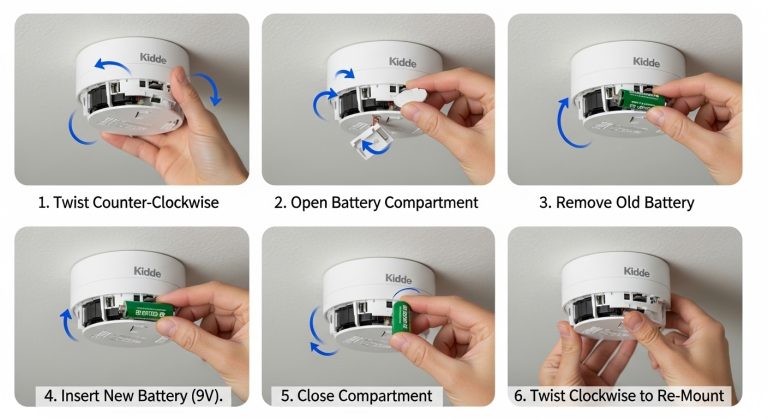
Start by removing the battery completely from your fire alarm to make certain a full reset. Next, press and hold the test button for 15–20 seconds to clear any residual charge. Reinstall a fresh battery, guaranteeing correct orientation.
Wait 60 seconds to confirm the chirping has stopped. If it continues, replace the battery again or consider a new alarm if older than 10 years. Using a sealed 10-year lithium battery can reduce the frequency of replacements and prevent low-battery chirps.
| Step | Action | Tip |
|---|---|---|
| 1 | Remove battery | Guarantee complete removal |
| 2 | Hold test button 15-20s | Discharge internal circuits |
| 3 | Reinstall fresh battery | Insert with correct polarity |
| 4 | Wait 60 seconds | Monitor for chirping |
Perform this reset annually or when low battery chirps start.
How to Reset Hardwired Fire Alarms That Keep Beeping?
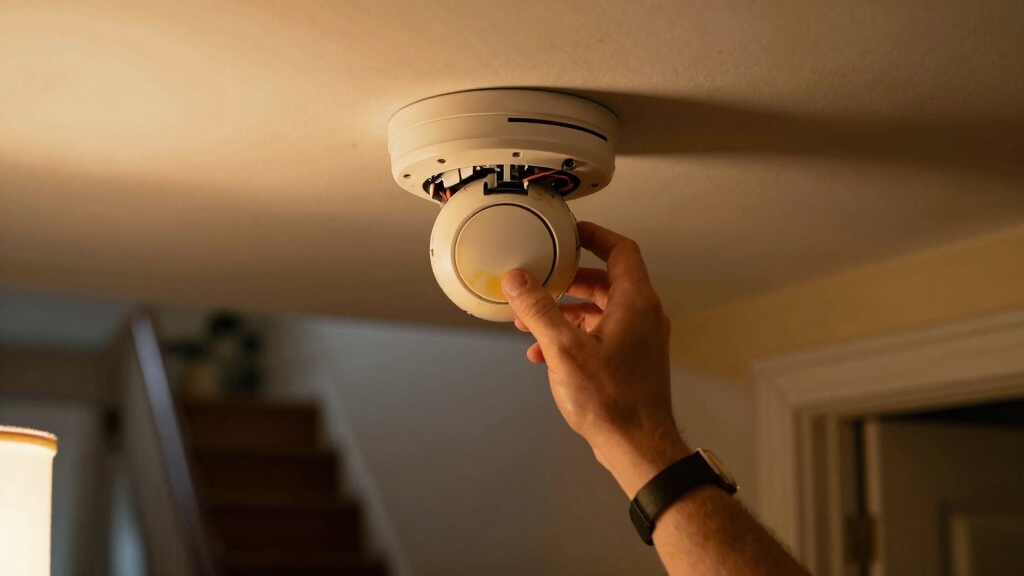
Turn off the power at the circuit breaker before resetting your hardwired fire alarm to make sure electrical hazards are prevented.
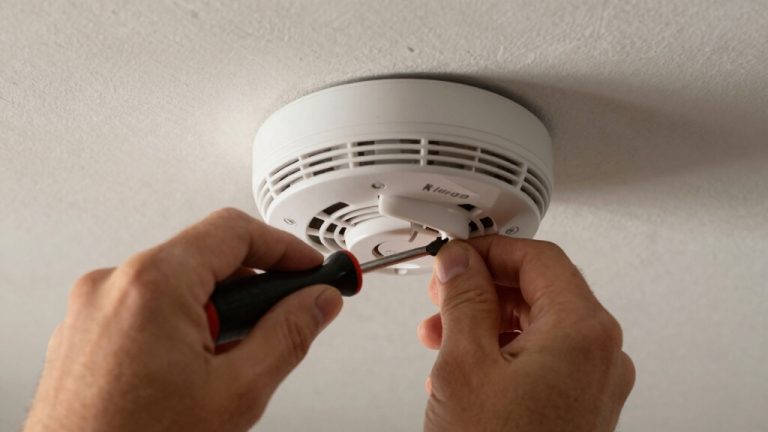
Once the power is off, carefully disconnect the alarm from its mounting bracket and unplug the power supply.
Press and hold the test button for 15 to 20 seconds to drain any residual charge and reset the internal circuitry.
After this, reconnect the power supply and secure the alarm back onto the mounting bracket.
Finally, turn the power back on at the circuit breaker and monitor the alarm for at least 60 seconds to make sure the beeping has stopped.
If the alarm continues to beep, consider checking the battery backup or consult a professional, as persistent chirping may indicate a deeper issue.
Keep in mind that many fire alarms are part of monitored systems which can automatically notify emergency services, so proper maintenance is crucial to ensure safety.
How to Clean Fire Alarms to Stop False Beeping?
After resetting your hardwired fire alarm, persistent false beeping may signal the need for a thorough cleaning.
Start by turning off power at the circuit breaker to guarantee safety. Use a soft brush or compressed air to gently remove dust, dirt, and insects from vents and sensors, which often cause false alarms.
Avoid harsh cleaners or water that can damage components. Pay close attention to areas around the sensor, as buildup here frequently mimics end-of-life chirps.
Regular cleaning not only stops false beeping but also extends your alarm’s life. Remember, placing alarms away from kitchens or bathrooms helps prevent steam or humidity triggers.
After cleaning, restore power and monitor the alarm for continued false signals before considering further action. Proper maintenance and inspection, similar to fire extinguisher upkeep, are essential for reliable fire safety equipment.
When to Silence Your Fire Alarm?
Although it’s tempting to silence your fire alarm immediately when it starts beeping, you should only press the silence or acknowledge button after confirming there’s no actual danger.
First, check for fire, smoke, or any warning indicators on your alarm. If you’re certain the alert is false, caused by low battery chirps, dust, or steam, you can press the silence button to stop the noise temporarily.
Remember, silencing doesn’t fix the underlying issue. Use this feature to reduce disruption while you address the cause, such as replacing batteries or cleaning the unit.
Never silence an alarm if you’re unsure about potential hazards; evacuate and call emergency services instead. Proper use of the silence function guarantees safety without ignoring real threats.
For fires, using the correct extinguisher with appropriate dry chemical powders can effectively suppress flames and prevent further danger.
When to Replace Your Fire Alarm?
Hey there! So, let’s talk about fire alarms for a moment. It’s really important to replace them when they hit the end of their lifespan, which is usually around 7 to 10 years, depending on the type you have.
Now, how can you tell if it’s time for a switch? Well, if you hear persistent beeping even after you’ve reset it, that’s a sign! Also, check the back label for a date code; that’ll tell you how old it is.
Regular testing and maintenance, such as pressing the test button monthly, help ensure your alarm remains reliable and can alert you promptly in case of emergency, which is essential for maintaining detector effectiveness.
Alarm Lifespan Indicators
Understanding the lifespan of your fire alarm is essential for maintaining reliable home safety.
Most smoke alarms last about 10 years, while carbon monoxide or combination alarms typically expire after 7 years. Check the date code on the back of your device to verify its age.
Once an alarm nears its lifespan, internal components degrade, causing false alarms or persistent beeping that resetting won’t fix.
Don’t ignore these signs; continued use beyond recommended years compromises your protection. Regularly inspect your alarms and plan to replace them promptly at the end of their service life.
Doing so makes certain your system functions correctly and provides timely warnings during emergencies, keeping you and your household safe. Always consult manufacturer guidelines for precise lifespan details.
Keep in mind that sensor degradation is a common cause of reduced accuracy and false alarms as detectors age.
Replacement Timing Signs
When your fire alarm starts emitting persistent chirps or false alerts despite regular maintenance, it’s a clear indication that replacement is necessary.
Typically, smoke and heat alarms last about 10 years, while carbon monoxide and combination alarms require replacement every 7 years.
Check the date code on the back label to confirm the device’s age. If your alarm continues beeping after battery replacement, cleaning, and resetting, it’s likely reached the end of its functional life.
Don’t ignore these signs, as outdated alarms may fail to detect hazards effectively. For safety, replace your unit promptly with a certified model. If unsure, have a professional inspect your system to make certain reliable operation and peace of mind.
Regular maintenance and proper installation of carbon monoxide detectors are essential to ensure early detection and prevent hidden risks associated with this odorless, colorless gas.
Frequently Asked Questions
Can I Use Rechargeable Batteries in My Fire Alarm?
You can use rechargeable batteries in your fire alarm, but it’s not always recommended.
Rechargeables tend to have a lower voltage than standard alkaline batteries, which might cause false chirping or reduced alarm sensitivity.
Always check your alarm manufacturer’s guidelines before switching. If you choose rechargeables, make certain they’re high-quality NiMH types and monitor the alarm regularly.
For reliable performance, traditional alkaline batteries remain the safest choice.
How Often Should I Test My Fire Alarm for Functionality?
You should test your fire alarm once a month to make sure it’s functioning properly.
Press and hold the test button until you hear a loud alarm sound, confirming the unit works.
Regular monthly testing helps catch issues early, like battery failures or sensor problems.
Don’t forget to replace batteries yearly or when low, and clean the unit periodically to maintain reliability. Staying proactive keeps your home safe.
What Causes Fire Alarms to Beep After a Power Outage?
Think of your fire alarm like a groggy sleeper. It beeps after a power outage because it’s waking up abruptly, triggered by power surges or interruptions.
When electricity cuts off and returns, the alarm detects this sudden change and chirps to signal it’s resetting. To fix this, you’ll need to reset the device: turn off the breaker, disconnect the alarm, hold the test button, then reconnect and restore power to silence the beep.
Are There Smart Fire Alarms That Connect to My Phone?
Yes, you can find smart fire alarms that connect directly to your phone. These devices send alerts about smoke, carbon monoxide, or low batteries straight to your smartphone, letting you monitor your home remotely.
They often integrate with smart home systems and allow you to silence alarms or test sensors via an app. Opt for models from trusted brands with clear setup instructions to guarantee reliable, real-time notifications.
How Do Humidity Levels Affect Fire Alarm Performance?
Humidity can cause your fire alarm to beep falsely by triggering its sensors mistakenly. When moisture from steam or high humidity enters the alarm, it may interpret it as smoke particles, causing unwanted alerts.
To maintain accurate performance, avoid installing alarms near bathrooms or kitchens and ensure proper ventilation.
Regular cleaning helps prevent moisture buildup, so keep sensors dry and dust-free to reduce false alarms caused by fluctuating humidity levels.
Stay Alert, Stay Safe: Keep Your Fire Alarm Reliable
Did you know that nearly 70% of false fire alarm alerts are caused by low batteries or dust buildup? To stop your alarm from beeping, regularly check and replace batteries, clean the unit, and reset it properly.
Remember, silencing your alarm is only a temporary fix. Replace it if it keeps beeping despite troubleshooting. Staying proactive guarantees your fire alarm functions reliably, keeping you and your home safe at all times.