
To change your Kidde smoke alarm battery, first locate and note the model number to guarantee you use the correct replacement.
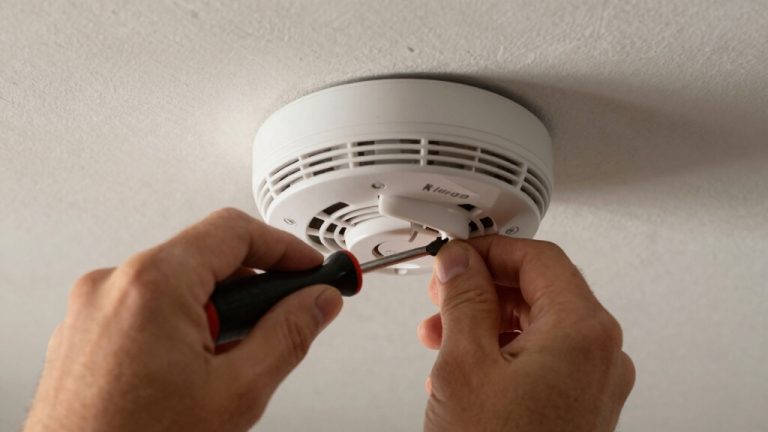
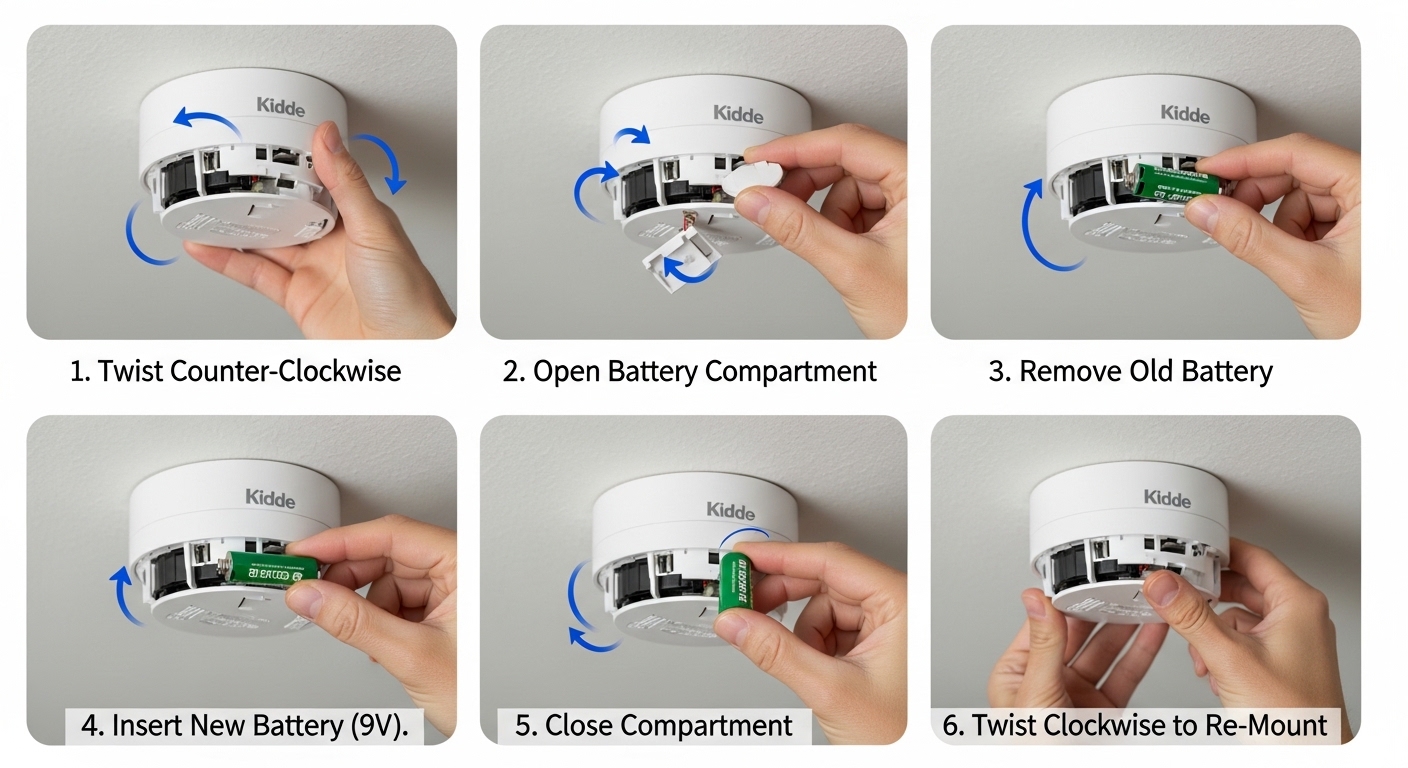
Remove the alarm from its mounting by twisting it off. Then, open the battery compartment carefully; front-loading models pop open by pressing down, while rear-loading require pressing a red tab.
Replace the battery with a fresh 9-volt, matching polarity. Test the alarm before reinstalling it securely.
Follow proper disposal and safety steps to maintain reliable protection. More detailed steps and tips can guide you through the process smoothly.
Key Takeaways
- Locate the model number on the back or inside the battery compartment to identify the correct battery type.
- Twist alarm counterclockwise to remove it from the mounting plate and remove any tamper-resist pin.
- Open the battery compartment by pressing down the door or red battery reminder finger, then carefully remove the old battery.
- Insert a fresh 9-volt battery matching the correct polarity and battery connectors, then securely close the compartment door.
- Test the alarm by pressing the test button until it sounds before reinstalling and twisting the alarm clockwise to lock it in place.
Identify Your Kidde Smoke Alarm Model Number
Before you replace the battery, identify your Kidde smoke alarm’s model number.
Ensure safety by identifying your Kidde smoke alarm’s model number before replacing the battery.
Locate the label on the back of the alarm or inside the battery compartment.
The model number is essential because it directs you to the correct battery type and replacement procedure.
Using the wrong battery can compromise safety and functionality.
If you can’t find the label, consult your user manual or check Kidde’s website.
Write down the model number before proceeding.
This step guarantees you follow the manufacturer’s specific instructions and maintain compliance with safety standards.
Skipping this can lead to errors in battery installation or alarm operation.
Always verify your model number first to guarantee a safe and effective battery replacement process.
Regular maintenance, including checking the manufacture date, ensures your alarm remains reliable and is replaced promptly when nearing the end of its 10-year lifespan.
When and Why to Replace Your Kidde Smoke Alarm Battery?
You should really think about replacing your Kidde smoke alarm battery every six months. But don’t wait that long if you hear the alarm signal a low battery! That’s your cue to swap it out right away.
Also, keep an ear out for those end-of-life alerts. When you hear those, it means the entire alarm needs to be replaced for your safety.
A handy tip? Use daylight savings time as a reminder to change your batteries. It’s a simple way to make sure you never miss that important battery change!
Many Kidde smoke alarms use backup batteries to ensure continuous operation during power outages, so timely replacement is critical.
Replacement Timing Guidelines
Although your Kidde smoke alarm can function for months on a single battery, it’s essential to replace the battery every six months or immediately when the unit signals a low battery warning.
Timely replacement assures continuous protection and prevents false alarms or failures. Use these guidelines to stay on track:
- Replace batteries every six months, using daylight savings time as a reminder.
- Act immediately when you hear a low battery chirp; don’t delay.
- Use the correct 9-volt battery or the specific type recommended for your model.
- Test the alarm after installation to confirm proper operation before reinstalling.
Following these timing practices guarantees your smoke alarm remains reliable when you need it most. For enhanced convenience and longer life, consider Kidde models that offer 10-year sealed lithium batteries to reduce replacement frequency.
Importance of End-of-Life Alerts
When your Kidde smoke alarm signals an end-of-life alert, it means the unit has reached the end of its functional lifespan and needs replacing, not just a new battery.
This alert warns you that the alarm can no longer reliably detect smoke or carbon monoxide, making it unsafe to rely on.
Don’t ignore these signals. Replacing the entire unit promptly guarantees continuous protection.
While changing your battery every six months is essential, end-of-life alerts require more urgent action.
Carbon monoxide alarms, in particular, won’t detect CO during end-of-life mode.
Always follow the manufacturer’s recommendations and replace the alarm as soon as you receive this alert to maintain your home’s safety and comply with safety standards.
Regular maintenance, including replacement every 10 years, is crucial to ensure your smoke alarm remains effective and reliable.
Choosing the Right Replacement Battery for Your Kidde Smoke Alarm
Selecting the correct replacement battery guarantees your Kidde smoke alarm functions reliably when you need it most.
Using the wrong battery can cause malfunctions or false alarms, compromising your safety.
Here’s how to choose the right one:
- Match the original battery type, usually a 9-volt for most Kidde smoke alarms.
- Make certain the voltage is correct; never substitute with a lower or higher voltage battery.
- Confirm battery connectors align properly with the unit’s terminals, regardless of brand.
- For models with dual batteries, install each battery with contacts facing opposite directions as specified.
Always consult your alarm’s manual to verify battery specifications.
Choosing the right replacement battery makes certain your alarm stays operational and responsive to smoke detection at all times.
For best performance, replace your 9V battery every 6 to 12 months to avoid low-battery alerts and ensure continuous protection.
How to Open the Battery Compartment on Front-Loading Models?
To open the battery compartment on front-loading Kidde smoke alarms, just press down firmly on the battery door until it pops open.
It’s pretty straightforward!
Once that’s done, carefully pull the old battery straight out.
Just a heads-up: try to avoid damaging the connectors while you do this.
Safety first, right?
And don’t forget to handle the battery safely and dispose of it properly before you pop in a new one.
Your safety is key!
For optimal performance, always use fresh alkaline batteries and avoid mixing old and new ones to prevent premature battery failure.
Battery Door Release
You’ll pop open the battery compartment on front-loading Kidde smoke alarms by pressing down on the battery door until it releases. This design guarantees a secure fit while allowing quick access for battery changes.
Follow these steps carefully:
- Place your thumb firmly on the battery door.
- Apply steady downward pressure until you feel the door release.
- Gently pull the door open to access the battery compartment.
- Keep the door and unit steady to avoid damage during opening.
Always handle the battery door with care to prevent breaking the latch. Opening the compartment correctly maintains the alarm’s safety integrity and guarantees easy battery replacement. It is essential to use high-quality 10-year lithium batteries to ensure reliable backup power and reduce maintenance frequency.
Don’t force the door open if it resists; check for proper alignment or consult the manual for your specific model.
Removing Old Battery
After carefully opening the battery compartment on your front-loading Kidde smoke alarm, it’s time to remove the old battery. Press down on the compartment door until it pops open. Pull the old battery straight out, taking care not to damage the connectors.
Make sure to note the orientation of the positive (+) and negative (−) terminals, which should match the yellow label inside the compartment.
| Step | Action | Tip |
|---|---|---|
| 1 | Press down battery door | Use firm pressure |
| 2 | Release door to open | Don’t force it |
| 3 | Pull battery straight out | Avoid bending connectors |
| 4 | Check terminal orientation | Match yellow label (+ and −) |
| 5 | Dispose of old battery safely | Follow local battery disposal |
Handle batteries with care to ensure safe replacement. If your smoke alarm is hardwired or interconnected, be aware of the interconnection feature which may cause multiple alarms to sound during battery removal.
How to Change Batteries in Rear-Loading Kidde Smoke Alarms?
Begin by removing the alarm from its mounting plate, twisting it in the direction of the “Off” arrow. If your alarm has a tamper-resist pin, remove it first. Once detached, locate the battery compartment on the rear.
Start by twisting the alarm off its mounting plate, removing any tamper-resist pin first.
Follow these steps to change the battery safely:
- Press down the red battery reminder finger inside the compartment.
- Align the new 9-volt battery connectors with the metal plates inside.
- Insert the battery carefully, ensuring correct polarity.
- Snap the compartment door closed securely.
After replacing, test the unit by pressing the test button. Confirm it operates solely on battery power before reinstalling.
Proper battery alignment and reminder finger positioning are vital for reliable alarm function and safety. Always remember to perform a monthly test to ensure the alarm remains fully operational.
Replacing Batteries in Hardwired Kidde Smoke Alarms
To replace batteries in hardwired Kidde smoke alarms, first disconnect the unit from its mounting plate by twisting it counterclockwise toward the “Off” arrow.
Next, carefully remove the Quick Connect wire harness by squeezing the plastic prongs and pulling it free. If your model has a tamper-resist pin, remove it before opening the battery compartment.
Press down the red battery reminder finger inside the compartment, then pull out the old battery. Insert the new battery, ensuring the connectors align with the metal plates inside the compartment.
Close the battery door until it snaps securely. Don’t reinstall the alarm yet; testing comes next. Always use the recommended battery type and handle wiring with caution to maintain safety and functionality.
Regular maintenance, including monthly testing and annual battery replacement, is essential to ensure the reliability and safety of your hardwired smoke alarm system.
Testing and Reinstalling Your Kidde Smoke Alarm After Battery Replacement
You should always test your Kidde smoke alarm immediately after replacing the battery to make sure it functions correctly on battery power alone. This step ensures your alarm is ready to protect your home.
Follow these steps to test and reinstall your smoke alarm safely:
- Press and hold the test button until the alarm sounds, confirming battery power.
- If the alarm doesn’t sound, check battery placement and try again.
- Align the alarm’s mounting holes with the plate on the ceiling or wall.
- Twist the alarm clockwise until it locks securely in place.
Never reinstall the alarm without a successful test. Regular testing ensures your Kidde smoke alarm reliably detects smoke and safeguards your household.
Frequently Asked Questions
How Do I Reset My Kidde Smoke Alarm After Battery Replacement?
To reset your Kidde smoke alarm after replacing the battery, press and hold the test button for 15-20 seconds until the alarm beeps or chirps, indicating a reset.
This clears any low battery warnings or error signals. Make sure the battery is properly installed with connectors aligned.
Then test the unit to confirm it’s working. If it doesn’t reset, remove the battery and reinstall it, then try again.
Can I Use Rechargeable Batteries in My Kidde Smoke Alarm?
Sure, if you want your smoke alarm to throw a party every time the battery dips below full charge, go ahead and use rechargeables.
But seriously, Kidde smoke alarms aren’t designed for rechargeable batteries.
You should stick to recommended non-rechargeable 9-volt batteries for reliable performance.
Rechargeables can cause false alarms or fail to power the unit correctly, putting your safety at risk.
Always prioritize proper battery specs to keep your home safe.
What Should I Do if My Smoke Alarm Chirps After Battery Replacement?
If your smoke alarm chirps after replacing the battery, first check if the battery is installed with correct polarity, matching the plus and minus connectors to the compartment labels.
Make sure the battery type matches the original and the contacts are clean and aligned.
Press the battery reminder finger down if present.
Test the unit by pressing the test button. If it still chirps, try replacing the battery with a fresh one or consult the manual for reset instructions.
How Do I Dispose of Old Smoke Alarm Batteries Safely?
Don’t just toss old smoke alarm batteries in the trash. You could be risking harm to the environment or even your safety.
Instead, take them to a local battery recycling or hazardous waste disposal center. Many stores also offer battery drop-off points.
Before you go, place the batteries in a non-conductive container or tape the terminals to prevent sparks. Proper disposal keeps you safe and protects the planet.
Are Kidde Smoke Alarms Compatible With Smart Home Systems?
Yes, some Kidde smoke alarms are compatible with smart home systems, especially their Wi-Fi-enabled models.
You can connect these alarms to apps for real-time alerts on your phone. Always check your specific model’s compatibility before purchasing.
When integrating, follow manufacturer instructions carefully to maintain safety features.
Avoid tampering with hardwired connections unless you’re qualified, ensuring your smoke alarm stays reliable and compliant with local safety codes.
Power Up Your Home’s First Line of Defense
Changing your Kidde smoke alarm battery is like renewing a shield that guards your home’s safety.
By following these clear steps, you make certain your alarm stays vigilant, ready to sound the alert when it matters most.
Don’t let a worn-out battery dim your protection. Replace it promptly and test your alarm.
A little care now keeps your family safe tomorrow, turning your smoke alarm from a silent sentinel into a reliable lifesaver.