
To choose the right security camera, first analyze your property’s layout and prioritize critical monitoring areas like entrances and vulnerable spots.
Decide between indoor, outdoor, or combined models based on environment and durability needs.
Select cameras with at least 1080p resolution and a suitable field of view to capture clear identification details.
Prioritize reliable power options, robust network security, and advanced features such as motion detection and encrypted storage.
Optimizing placement and technology guarantees effective surveillance. Understanding these fundamentals leads to a more secure setup.
Key Takeaways
- Identify monitoring needs and property type to decide indoor, outdoor, or combined camera setups and optimal placement locations.
- Choose camera styles (bullet, dome, wireless) based on environment, aesthetics, and threat points for effective coverage and durability.
- Prioritize at least 1080p resolution with appropriate field of view and night vision capabilities for clear identification and low-light performance.
- Select power options (battery, hardwired, solar) considering site conditions, maintenance tolerance, and desired installation flexibility.
- Ensure network compatibility with secure WiFi bands, advanced features like motion detection, and encrypted storage for reliable, protected surveillance.
Assess Security Needs and Property Type
Effective security begins with a clear understanding of your specific surveillance needs and property type. Start by pinpointing key areas that require monitoring, such as entry points or vulnerable zones.
Analyze whether your property demands indoor, outdoor, or combined camera setups without delving into their types yet. Assess the criticality of image quality, focusing on resolution sufficient to identify faces or license plates.
Factor in budget constraints early to balance performance and cost effectively. Consider the nature of your property, whether it’s a sprawling estate or a compact apartment complex, as this influences camera quantity and placement strategies.
A methodical evaluation here lays the groundwork for optimized coverage. This ensures your surveillance system meets operational objectives without unnecessary expenditure or technical compromises.
Additionally, optimizing camera placement based on lighting and wiring accessibility can maximize protection and system efficiency.
Choose Indoor, Outdoor, or Combined Security Cameras
Security cameras come in distinct categories designed for specific environments, so choosing between indoor, outdoor, or combined systems depends on your surveillance goals and site conditions.
Indoor cameras prioritize aesthetics and discreet monitoring, often featuring dome designs resistant to tampering. They’re ideal for controlled environments without exposure to weather.
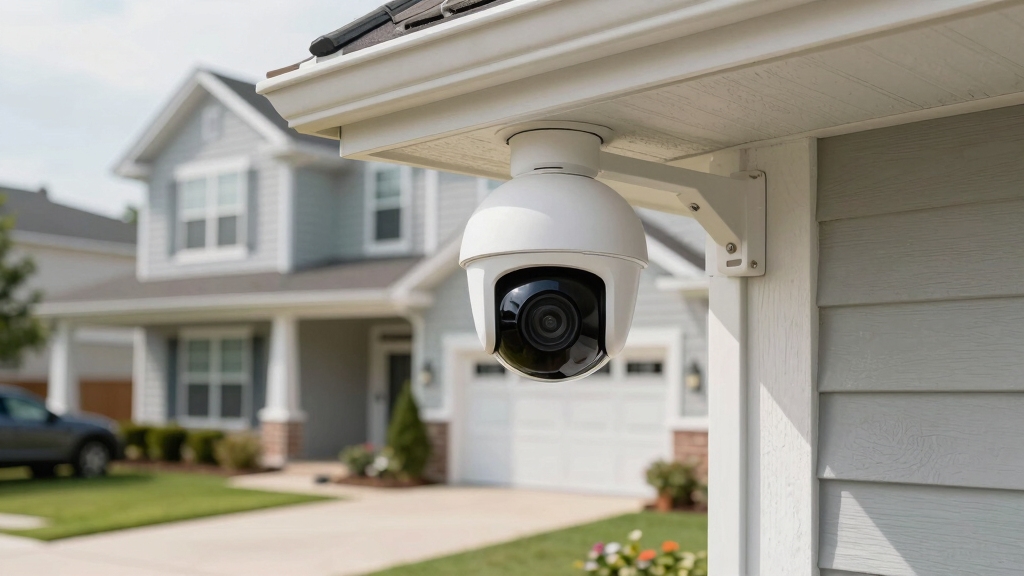
Outdoor cameras require robust weatherproofing, extended night vision, and vandal resistance. They often utilize bullet form factors for targeted long-range coverage.
Combined systems provide flexibility, integrating both indoor and outdoor units to create comprehensive surveillance tailored to property layout and risk zones.
When selecting, assess placement constraints, environmental challenges, and required durability. Opt for cameras engineered for their intended setting to guarantee optimal performance, reliability, and longevity.
This avoids premature failures and surveillance blind spots. This technical alignment maximizes security effectiveness while optimizing installation and maintenance efforts. Additionally, considering the camera’s IP rating ensures reliable operation under varying weather conditions.
Select Camera Resolution and Field of View
When picking a camera, aim for at least 1080p resolution. This way, you can clearly identify faces and license plates. It really makes a difference in the quality of your footage!
Also, consider the field of view. A wider angle means you can cover more ground with fewer cameras, which is a smart way to set up your surveillance.
And don’t forget about digital zoom! Higher resolution allows you to zoom in on details without sacrificing image quality, so you can capture everything you need.
Keep in mind that low pixel count in budget cameras can result in smudged faces and mosaic-like license plates that obstruct recognition.
Minimum Resolution Requirements
Prioritize camera resolution to guarantee clear identification of critical details like faces and license plates. A minimum of 1080p resolution is essential to assure sufficient image clarity for accurate recognition.
Higher resolutions, such as 4MP or above, enable effective digital zoom without substantial pixelation, allowing you to extract details post-capture. Keep in mind that resolution directly impacts storage and bandwidth requirements, so balance quality with system capacity.
While selecting resolution, consider your field of view to avoid compromising detail over larger areas. Fixed-lens cameras often provide an 83-degree angle, which is adequate for many applications.
Ultimately, adhere to resolution standards that meet your surveillance goals, assuring footage delivers actionable intelligence and supports reliable identification under varying conditions.
Also, remember that higher resolution increases processing power and bandwidth needs, which can affect overall system performance and frame rates.
Benefits Of Wider View
Often overlooked, the field of view substantially influences camera placement and overall system efficiency. A wider field of view lets you cover more area with fewer cameras, reducing costs and complexity.
It also minimizes blind spots and simplifies monitoring by providing a thorough image. However, wider angles can reduce image detail per area, so balancing resolution and field of view is critical for effective identification.
| Field of View (Degrees) | Coverage Area Example |
|---|---|
| 60 | Narrow hallway or doorway |
| 83 | Standard fixed-lens cameras |
| 110 | Large room or small yard |
| 130+ | Wide outdoor perimeter |
Choose a camera with an ideal field of view aligned to your surveillance zones to maximize efficiency and clarity. The camera’s unique identifier, or UID, plays a crucial role in securely connecting and managing devices within a surveillance network.
Digital Zoom Advantages
While a wider field of view covers more area, it can compromise the level of detail visible in the footage. That’s where digital zoom becomes essential.
By selecting a camera with higher resolution, at least 1080p, you gain the ability to digitally magnify specific areas without losing image clarity. This lets you focus on critical details like faces or license plates after the footage is recorded.
Digital zoom extends your camera’s functional range, reducing the need for multiple cameras to cover both broad and focused views. However, keep in mind that digital zoom depends entirely on initial pixel density.
Lower resolution cameras won’t provide usable zoomed-in images. Prioritize higher resolution and appropriate field of view to balance surveillance coverage with detailed, actionable footage.
For optimal continuous recording without WiFi, consider cameras with reliable local storage options such as microSD cards or NVR systems.
Pick Night Vision Features for Low-Light Security
Night vision capabilities play a vital role in guaranteeing clear surveillance during low-light conditions. When selecting a security camera, focus on infrared (IR) night vision technology to capture detailed images in darkness.
Consider these critical factors:
Night vision distance: Guarantee the IR range covers essential areas, typically 35ft for facial recognition and 100ft for general monitoring.
Camera resolution: Higher megapixels (e.g., 4MP) improve night clarity and detail identification.
Lens angle: An 80-degree field balances coverage and detail at night.
Outdoor suitability: Cameras designed for extended night vision resist weather and maintain image quality.
Infrared LED quality: High-quality LEDs prevent overexposure and guarantee uniform illumination.
Additionally, cameras with low-lux color night display combined with infrared night vision provide enhanced image clarity even in near-total darkness.
Choose Camera Styles: Bullet, Dome, or Wireless
When selecting camera styles, you’ll want to zero in on bullet, dome, or wireless options based on your surveillance environment and installation needs. Bullet cameras excel outdoors with long-range focus and adjustable mounts.
Dome cameras fit discreet indoor setups with wide-angle views and tamper resistance. Wireless cameras offer flexible placement but depend on reliable connectivity.
| Camera Style | Key Attributes |
|---|---|
| Bullet | Outdoor, long-distance, adjustable |
| Dome | Indoor, discreet, vandal-resistant |
| Wireless | Flexible placement, connectivity-dependent |
Analyze your property’s layout and threat points to match style capabilities. Bullet cameras suit perimeter coverage. Dome units fit common indoor areas, and wireless models adapt to complex environments.
Your choice impacts installation complexity and surveillance effectiveness. For enhanced concealment and functionality, consider mounting cameras high on furniture or architectural features to maximize vantage points and reduce detection risk.
Compare Power Options: Battery, Hardwired, or Solar
When you’re considering power options for your cameras, it’s important to think about the pros and cons of each. For instance, battery power gives you a lot of flexibility in terms of placement, but you’ll have to keep an eye on recharging. Depending on the model, that could mean recharging anywhere from once a week to just once a year.
On the other hand, hardwired cameras provide a steady stream of power, which is super convenient. However, the downside is that they limit where you can install them since they need to be close to a power source.
Then we’ve solar panels, which are a great option, especially for outdoor setups. They’re energy-efficient and can help extend your battery life significantly, so you won’t have to worry about frequent recharging.
Additionally, using Power over Ethernet (PoE) can simplify wiring by delivering power and data over a single cable for hardwired IP cameras.
Battery Power Pros Cons
Battery-powered security cameras offer flexibility in placement since they don’t rely on nearby power outlets.
However, you’ll need to manage recharging intervals that can range from weekly to annually, depending on usage and model.
This power option suits locations without wiring access but demands attention to battery life and replacement.
Key considerations include:
- Easy installation without electrical expertise or conduit.
- Limited runtime requiring recharge or battery swaps.
- Potential downtime during power maintenance.
- Ideal for portable or temporary surveillance needs.
- Performance affected by temperature and usage intensity.
Wireless cameras often rely on motion-activated recording to conserve battery life, which may create coverage gaps during inactivity, impacting continuous monitoring battery consumption.
Understanding these factors helps you decide if battery power aligns with your surveillance goals and site constraints.
This balance between convenience and maintenance demands is crucial for uninterrupted security coverage.
Hardwired Versus Solar
In comparing hardwired and solar power options for security cameras, understanding their operational strengths and limitations is essential to optimize surveillance reliability.
Hardwired cameras provide consistent power without interruptions, ensuring continuous operation and high data transmission stability. However, their installation demands professional wiring, which may limit placement flexibility and increase upfront costs.
Solar-powered cameras leverage renewable energy, offering greater installation freedom and reduced maintenance by extending battery life. Yet, they depend on sufficient sunlight exposure, making them less reliable in shaded or low-light environments.
When choosing between these, consider your site’s power accessibility, environmental conditions, and maintenance tolerance. Hardwired suits permanent, high-demand setups, while solar suits remote or flexible locations with adequate sunlight, balancing autonomy against potential power variability.
Evaluate WiFi Bands and Network Security
Although choosing the right camera hardware is essential, evaluating WiFi bands and network security plays an equally indispensable role in guaranteeing reliable performance and protecting your surveillance data.
You need to match your security camera to the optimal WiFi frequency band and strengthen your network against vulnerabilities.
Use 2.4GHz WiFi for better range and wall penetration, especially in large or multi-room properties.
Choose 5GHz for higher speeds and less interference in dense WiFi environments, ideal for HD streaming.
Opt for dual-band routers to provide compatibility and seamless switching between bands.
Implement WPA3 encryption on your network to prevent unauthorized access.
Regularly update firmware to patch security flaws and enhance network stability.
These steps guarantee your camera remains connected securely and consistently.
Explore Advanced Camera Features and Footage Encryption
While selecting the right hardware lays the foundation, advanced camera features and robust footage encryption elevate your security system’s effectiveness and privacy.
Prioritize cameras with intelligent motion detection that differentiate humans from animals, reducing false alerts. Look for two-way audio to communicate directly through the camera, enhancing real-time intervention capabilities.
Make certain the device supports local and cloud storage with AES-256 encryption to safeguard your footage from unauthorized access or tampering.
Firmware updates should be automatic and secure, mitigating vulnerabilities. Additionally, seek cameras with tamper detection and alert functions to identify physical interference attempts.
These features collectively enhance system reliability and protect sensitive data, guaranteeing your surveillance setup delivers all-inclusive, encrypted monitoring that resists cyber threats while providing actionable intelligence.
Plan Installation and Coverage for Maximum Protection
To maximize your security system’s effectiveness, you need to strategically plan camera placement and coverage. Start by identifying critical areas requiring surveillance, like entrances, blind spots, and vulnerable exterior zones.
Optimize camera angles to leverage their resolution and field of view, minimizing blind spots. Balance indoor and outdoor coverage based on assessed risks. Make sure power and connectivity options support chosen locations without compromising performance.
Finally, integrate overlapping fields of view to avoid gaps and allow for detailed digital zoom when needed.
- Map high-traffic and entry points for prioritized coverage.
- Use wide-angle lenses for broad surveillance with fewer cameras.
- Position night vision cameras where low light impedes visibility.
- Secure power sources aligned with camera type and placement.
- Account for wall penetrations and WiFi range in connectivity planning.
Frequently Asked Questions
How Do I Maintain and Clean My Security Cameras Regularly?
You should clean your security cameras monthly by gently wiping lenses with a microfiber cloth to avoid scratches.
Use a mild, non-abrasive cleaner if needed, but never spray directly; apply to the cloth instead.
Inspect housing for dirt, debris, or damage and clear obstructions.
Regularly check connections and firmware updates to guarantee peak performance.
For outdoor cameras, confirm weatherproof seals remain intact to prevent moisture ingress and maintain image clarity.
Can I Integrate Security Cameras With Smart Home Systems?
Yes, you can integrate security cameras with smart home systems seamlessly.
While standalone cameras offer basic surveillance, connecting them to platforms like Alexa, Google Home, or Apple HomeKit lets you control devices via voice commands or apps.
This integration provides real-time alerts, automation, and centralized monitoring.
However, make certain compatibility and robust encryption standards like AES-256 to protect your data.
Smart integration enhances security efficiency but demands thoughtful setup and ongoing management.
What Are the Legal Restrictions for Recording Audio With Cameras?
You need to know that recording audio with security cameras is regulated by federal and state laws.
Generally, one-party consent laws allow you to record audio if you’re involved in the conversation. However, some states require all parties’ consent.
Always check local statutes to avoid illegal wiretapping claims.
In public spaces, audio recording is often restricted.
Disabling microphones on cameras in these areas is safer and legally compliant.
How Do Weather Conditions Affect Camera Performance Over Time?
Weather conditions directly impact your camera’s longevity and performance. Exposure to rain, snow, and humidity can cause corrosion and electrical failures if the camera lacks proper weather resistance.
Extreme temperatures may degrade internal components, affecting image quality and reliability. UV rays can deteriorate housing materials over time.
To mitigate these effects, choose cameras with robust weatherproof ratings, durable materials, and protective features designed for your specific environment.
What Is the Typical Lifespan of a Security Camera System?
You can expect a security camera system to last between 5 to 10 years, depending on quality and maintenance.
Outdoor cameras face harsher conditions, potentially shortening lifespan if weather resistance isn’t robust.
Regular firmware updates and cleaning extend functionality.
Battery-powered units may require more frequent replacements or battery swaps.
Investing in durable hardware with AES-256 encryption and weatherproof ratings guarantees reliable, long-term surveillance performance.
Final Thoughts: Building a Smarter Security System That Truly Protects
When choosing a security camera, you need to leave no stone unturned. Assess your property’s unique needs and environment carefully.
Then select the right camera type, resolution, and power source to match. Don’t overlook network security and advanced features like encryption to safeguard your footage.
By strategically planning installation and coverage, you’ll build a robust system that offers reliable protection. Remember, a well-chosen camera is your first line of defense against potential threats.