
To find a hidden GPS tracker, start by visually inspecting common spots like under the dashboard, inside kick panels, and around the OBD-II port for unusual devices or wiring.
Use your smartphone’s magnetometer and Bluetooth apps to detect nearby trackers. Sweep the vehicle slowly with a frequency or EMF detector, paying attention to regular signal spikes while driving.
Passive trackers won’t emit signals, so keen observation is key. Keep going to uncover detailed detection methods and expert advice.
Key Takeaways
- Visually inspect common hiding spots like the OBD-II port, under the dashboard, kick panels, and trunk for unfamiliar devices or wiring.
- Use smartphone apps to detect Bluetooth signals, magnets, and GPS transmissions that may indicate nearby active trackers.
- Sweep the vehicle slowly with a frequency detector focusing on cellular, Wi-Fi, and Bluetooth bands for periodic signal spikes around every 60 seconds.
- Employ an EMF detector near wiring harnesses and panels to find electromagnetic emissions from powered tracker circuits, noting regular signal bursts during movement.
- Document all suspicious findings, scan in low-noise environments, keep detectors within three feet, and consider professional help for expertly concealed trackers.
How to Spot a GPS Tracker With a Visual Inspection?
When you want to spot a GPS tracker visually, start by examining common vehicle access points like the OBD-II port beneath the steering wheel, where trackers often plug in.
Next, check the driver and passenger-side kick panels for small hardwired boxes zip-tied to wiring harnesses.
Don’t overlook the area under the hood, particularly around the battery tray and fuse box, for extra wiring or add-a-fuse taps.
Look closely at items disguised as USB chargers, dash cams, Bluetooth speakers, or OBD-II tools.
Use a flashlight or mechanic’s mirror to inspect hard-to-see spots, including under the dashboard and the vehicle’s underbody.
Stay methodical and thorough. Hidden trackers often blend with factory components but usually reveal subtle signs like unusual wiring or non-standard devices.
Also, be alert for signs of tampering such as fresh scratches or loose covers near electrical fixtures where trackers might be concealed.
Using Smartphone Apps to Detect GPS Trackers and Signals
Visual inspections can uncover many hidden GPS trackers, but they might miss devices that are well concealed or out of plain sight. That’s where smartphone apps come in handy.
Visual checks reveal many hidden GPS trackers, but well-hidden devices often require the help of smartphone apps.
Use magnetometer apps to detect strong magnets that might secure trackers to your vehicle’s metal surfaces. Bluetooth detector apps help spot nearby short-range devices, like voice recorders or trackers using Bluetooth connections.
GPS detector apps scan for active GPS signals around you, revealing transmitting devices. Remember, these apps only detect accessible signals; passive or non-transmitting trackers won’t show up.
Combine app scans with targeted searches using keywords and images of common tracker models to identify suspicious objects quickly. Always perform scans in low-electronic-noise environments for better accuracy and repeat while driving to catch periodic transmissions.
For more reliable detection, consider combining app usage with ferromagnetic detection methods that can identify hidden metal components even when devices are powered off.
How to Use Frequency Detectors to Find Hidden GPS Trackers?
For effective detection of hidden GPS trackers, frequency detectors scan for radio signals these devices emit during operation. You’ll want to sweep your vehicle slowly, focusing on areas like under the dashboard or near wiring.
These detectors pick up cellular, Wi-Fi, and Bluetooth signals, which trackers use to communicate. Keep the detector within three feet, as signal strength drops sharply beyond that. Look for periodic spikes, often every 60 seconds during movement, to identify active devices.
To ensure your safety and avoid interference, it is recommended to disconnect power sources before conducting scans, following standard safety first measures.
| Step | Action |
|---|---|
| 1. Power on detector | Calibrate and set to scan bands |
| 2. Sweep vehicle | Move detector close to suspect areas |
| 3. Note signal spikes | Identify regular RF transmissions |
Detecting GPS Trackers With Electromagnetic Field Sensors
Detecting hidden GPS trackers can be easier than you might think! They emit electromagnetic fields when they’re powered on, and that’s where an EMF detector comes in handy. This tool helps you locate those sneaky fields, especially in places where just looking around won’t cut it.
For the best results, though, it’s a good idea to pair your EMF detection with some frequency scanning. This combination allows you to pinpoint active devices much more accurately. So, if you’re on the hunt for a hidden tracker, using both methods is definitely the way to go!
Keep in mind that many trackers operate within specific radio frequency ranges, so understanding radio frequency interference can help you better identify and isolate the signals from hidden devices.
Understanding Electromagnetic Fields
Although GPS trackers often rely on radio frequencies, detecting their electromagnetic fields (EMF) can reveal their presence even when they’re not actively transmitting.
EMF detectors pick up the subtle electromagnetic emissions generated by the tracker’s electronic circuits.
When you scan a vehicle, focus on areas where hidden devices commonly reside, such as under the dashboard or near wiring harnesses.
Keep your movements slow and steady to notice fluctuations in the EMF readings.
Remember, many electronic components generate EMF, so use this method alongside visual or frequency-based checks to distinguish suspicious sources.
Understanding EMF patterns helps you identify anomalies that suggest a hidden tracker, even if it’s powered but silent.
This approach complements other detection tools for a thorough search.
Be aware that transient electromagnetic emissions can sometimes occur from normal vehicle electronics, so careful interpretation of EMF readings is essential.
Using EMF Detectors Effectively
Regularly calibrate your EMF detector before scanning to make certain of accurate readings when detecting GPS trackers.
Begin by turning off all unnecessary electronic devices in the area to minimize background interference.
Slowly sweep the detector over common hiding spots, under the dashboard, around wiring harnesses, and near the OBD-II port, maintaining a consistent distance.
Pay close attention to sudden spikes in electromagnetic fields, which may indicate an active or powered tracker.
Move methodically, covering all vehicle sections, including less obvious areas like under seats and inside trim panels.
Remember, silent or powered-down trackers might evade detection, so combining EMF readings with visual inspections increases success.
Finally, document any suspicious readings to review or share with a professional if needed.
Proper identification and testing, such as distinguishing devices that carry voltage only under certain conditions, are crucial to avoid electrical hazards during inspections.
Combining EMF With Frequency
Building on your EMF detector scans, pairing electromagnetic field sensors with frequency detectors sharpens your ability to pinpoint active GPS trackers.
Start by sweeping the vehicle with an EMF detector to locate electronic emissions.
Then use a frequency detector to identify specific radio signals, like cellular or Bluetooth transmissions.
This combination helps you distinguish between harmless electronics and suspicious devices emitting periodic signals.
Focus on areas where EMF spikes coincide with RF signals, especially near wiring harnesses or under panels.
Keep your scans slow and methodical, noting signal strength changes.
Remember, frequency detectors work best within a three-foot range, so get close for accurate readings.
Combining these tools reduces false positives and improves your chances of detecting both transmitting and semi-active trackers hidden inside electronics or vehicle trim.
Because many GPS trackers exploit standard pin-tumbler lock vulnerabilities, understanding kinetic energy transfer principles helps in anticipating their signal behaviors.
Common Hiding Spots for GPS Trackers in Vehicles
When you’re hunting for a hidden GPS tracker, knowing where to look can save you time and frustration.
Start by inspecting the OBD-II port beneath the steering wheel; trackers often plug in here.
Begin your search at the OBD-II port beneath the steering wheel where trackers commonly connect.
Check the driver and passenger kick panels for zip-tied boxes attached to wiring harnesses.
Don’t overlook under the hood near the battery tray or fuse box; extra wiring or add-a-fuse taps may signal a tracker.
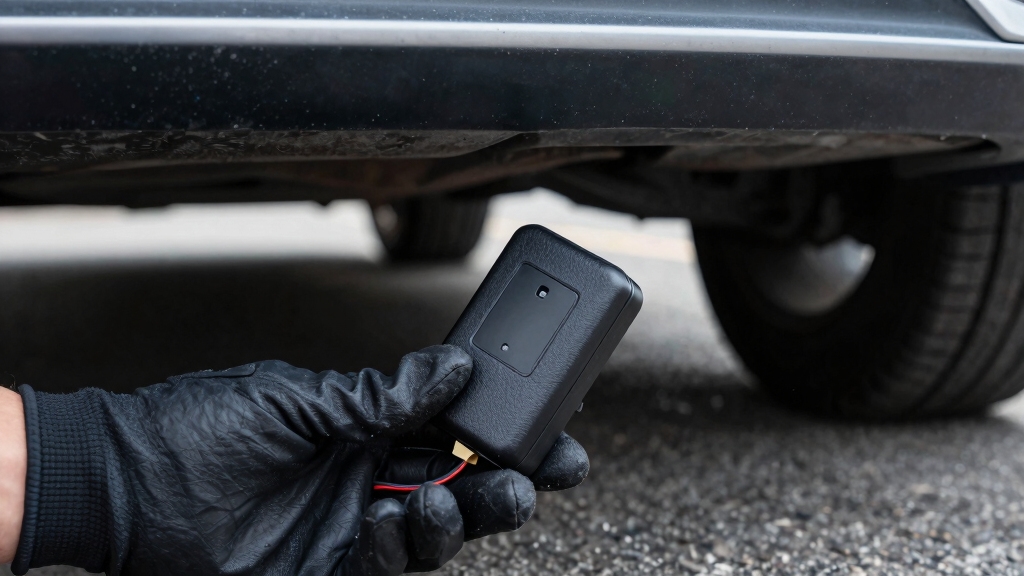
Look inside the glove compartment, trunk—especially under the rear window—and beneath bumpers for cellular trackers.
Some trackers disguise themselves as USB chargers, dash cams, or Bluetooth speakers.
Pay close attention to areas near the driver’s seat, where voice recorders or trackers might nestle.
Use a flashlight and mirror to access hard-to-see spots.
Methodically scanning these common hiding places heightens your chances of discovery.
Additionally, reinforcing vehicle components with tamper-resistant fasteners can help prevent unauthorized installation of tracking devices.
Testing for GPS Trackers While Driving by Monitoring Signals
As you’re driving around, keep an eye out for those signal spikes that pop up at regular intervals—usually around every 60 seconds.
It’s pretty interesting, right? To get the clearest picture of what’s going on, use the maximum hold mode on your frequency detector.
This way, you can really capture those peaks over time without any interruptions.
Noticing this kind of pattern can be super helpful; it might just indicate that there are hidden GPS trackers sending out data while you’re on the move.
Professional detection often involves specialized detection tools to ensure accuracy and preserve device integrity.
Signal Spike Detection
Although hidden GPS trackers often remain dormant while stationary, you can detect their presence by monitoring for regular signal spikes during driving.
As you drive, pay close attention to sudden bursts of radio frequency signals that repeat at consistent intervals, typically every 60 seconds.
These spikes indicate the tracker’s periodic data transmissions to cellular or satellite networks.
Use a frequency detector or spectrum analyzer to observe these uplink signals within a close range.
Note that the signal strength will sharply drop beyond three feet, so scan areas near the vehicle’s wiring, undercarriage, or interior panels.
Since many trackers rely on cellular network communication, detecting these signals can help confirm the presence of a GPS tracking device.
Maximum Hold Mode
Activate the maximum hold mode on your frequency detector or spectrum analyzer to capture and store the highest signal peaks over time. This method helps you identify periodic transmissions from GPS trackers while driving by highlighting consistent signal spikes.
Monitor frequencies between 100 kHz and 5.3 GHz closely, focusing on uplink signals that appear regularly, typically every 60 seconds. Keep the device within three feet for accurate detection, as signal strength drops sharply beyond this range.
Use the following table to track observations efficiently:
| Time (min) | Frequency (MHz) | Signal Peak (dBm) |
|---|---|---|
| 1 | 850 | -65 |
| 2 | 1900 | -70 |
| 3 | 850 | -63 |
| 4 | 1900 | -68 |
| 5 | 850 | -64 |
Regular Interval Monitoring
Regularly monitoring signal patterns while driving can reveal hidden GPS trackers transmitting at consistent intervals.
As you drive, use a frequency detector or spectrum analyzer in maximum hold mode to observe signal spikes. Trackers often emit signals every 30 to 60 seconds, creating a rhythmic pattern.
Note any repeating peaks in cellular or RF frequencies, especially those that appear only during movement. These signals typically strengthen when near the tracker and weaken when farther away.
Stay alert for consistent bursts rather than random noise. Document the timing and strength of these signals to help pinpoint the device’s location.
This method complements stationary inspections, allowing you to detect active trackers that only transmit while the vehicle is in motion.
Regular interval monitoring sharpens your detection accuracy and helps expose covert trackers.
Detecting Passive GPS Trackers That Don’t Emit Signals
Since passive GPS trackers don’t emit signals, you can’t rely on frequency or electromagnetic detectors to find them.
Instead, focus on a thorough visual inspection. Check common hiding spots like the OBD-II port, under the dashboard, and behind kick panels.
Use a flashlight and mechanic’s mirror to scan hard-to-see areas, including under the hood near the battery tray and fuse box.
Look for unfamiliar wiring, zip ties, or devices disguised as everyday electronics such as USB chargers or Bluetooth speakers.
Pay attention to anything that seems out of place or professionally installed.
Since passive trackers store data internally, they tend to be smaller and simpler, making careful observation your best tool for detection without signal-based technology.
When to Consult Professionals for GPS Tracker Detection?
While a careful visual inspection can uncover many passive GPS trackers, some devices are expertly concealed or use encrypted communication that resists detection.
You should consult professionals if you suspect hidden trackers after your own search, especially when devices are hardwired or embedded in vehicle electronics.
Professionals use specialized tools like nonlinear junction detectors and advanced spectrum analyzers, plus experience to identify covert trackers.
Consider expert help if you notice unexplained battery drains, frequent signal interference, or if legal concerns arise.
| Reason to Consult | Professional Advantage |
|---|---|
| Encrypted trackers | Advanced signal decryption |
| Hardwired devices | Access to vehicle internals |
| Intermittent signals | Continuous monitoring tools |
| Legal or safety issues | Proper evidence collection |
| Complex electronic setups | Skilled device localization |
Frequently Asked Questions
Can GPS Trackers Drain My Vehicle’s Battery Over Time?
Yes, GPS trackers can drain your vehicle’s battery over time, especially if they draw constant power without a dedicated source.
Trackers connected directly to the battery or OBD-II port keep running even when your car is off, slowly depleting the charge.
To avoid surprises, check for any unusual devices plugged in or hidden.
Using frequency or EMF detectors can also help identify active trackers that might be draining power.
How Long Do Hidden GPS Trackers Typically Last on a Single Battery?
Think of a hidden GPS tracker as a tiny candle flickering in the dark.
It usually lasts between one week and three months on a single battery.
The exact time depends on how often it pings your location.
Frequent updates burn the battery faster, while trackers that report less often conserve power.
If you’re inspecting, remember, shorter battery life means more frequent recharges or replacements.
Are There Legal Consequences for Secretly Placing a GPS Tracker?
Yes, you can face legal consequences for secretly placing a GPS tracker.
Laws vary by location, but generally, tracking someone without their consent violates privacy rights.
This can lead to criminal charges or civil lawsuits.
If you intend to use a tracker, get permission or make certain it’s your property.
Always research local regulations carefully to avoid penalties, fines, or even imprisonment.
Acting responsibly protects you from legal trouble.
Can Weather Conditions Affect GPS Tracker Signal Accuracy?
They say, “A chain is only as strong as its weakest link,” and weather can be that weak link for your GPS tracker.
Rain, snow, or heavy clouds interfere with satellite signals, reducing accuracy.
You’ll notice slight delays or position errors during storms.
However, the impact varies; light rain might do little harm, but dense fog or storms can disrupt signal strength markedly.
Always consider weather when evaluating tracker data reliability.
How Do Encrypted GPS Signals Impact Tracker Detection Methods?
Encrypted GPS signals make it harder for you to detect trackers using frequency detectors because the signals are scrambled, hiding identifiable patterns.
You’ll find it challenging to intercept or interpret transmissions, reducing the effectiveness of RF scanning.
However, visual inspections, electromagnetic field detectors, and nonlinear junction detectors remain useful since they identify physical devices regardless of signal encryption.
You should combine these methods for a thorough search despite encryption barriers.
Unmasking the Tracker You Never Knew Was There
Finding a hidden GPS tracker might feel like searching for a needle in a haystack, but with careful visual checks, smartphone apps, and frequency detectors, your chances improve dramatically.
While some trackers broadcast signals loudly, others stay silent and elusive. By staying methodical and observant, scanning common hiding spots and monitoring electromagnetic fields, you’ll catch what’s meant to stay hidden.
When in doubt, don’t hesitate to call in professionals to protect your privacy effectively.