
When your alarm panel shows “FC,” it means it’s failed to communicate with the monitoring center due to a signal disruption.
This usually happens because of issues like damaged phone lines, cellular network problems, or internet outages.
Your local alarms will still function, but remote monitoring is compromised until the connection is restored.
The panel keeps trying to resend signals automatically.
Understanding what causes this and how it impacts your system is key to regaining full security coverage.
Key Takeaways
- “FC” on an alarm panel means “Failed to Communicate,” indicating the panel couldn’t send signals to the monitoring center.
- It highlights a communication fault, not an issue with sensors or sirens.
- Common causes include damaged phone lines, cellular or internet outages, and faulty hardware like antennas or SIM cards.
- The panel keeps retrying signal transmission until it receives acknowledgment from the monitoring center.
- Local alarms still function, but remote monitoring and notifications are delayed or absent during an FC event.
What Does FC Mean on Your Alarm Panel?
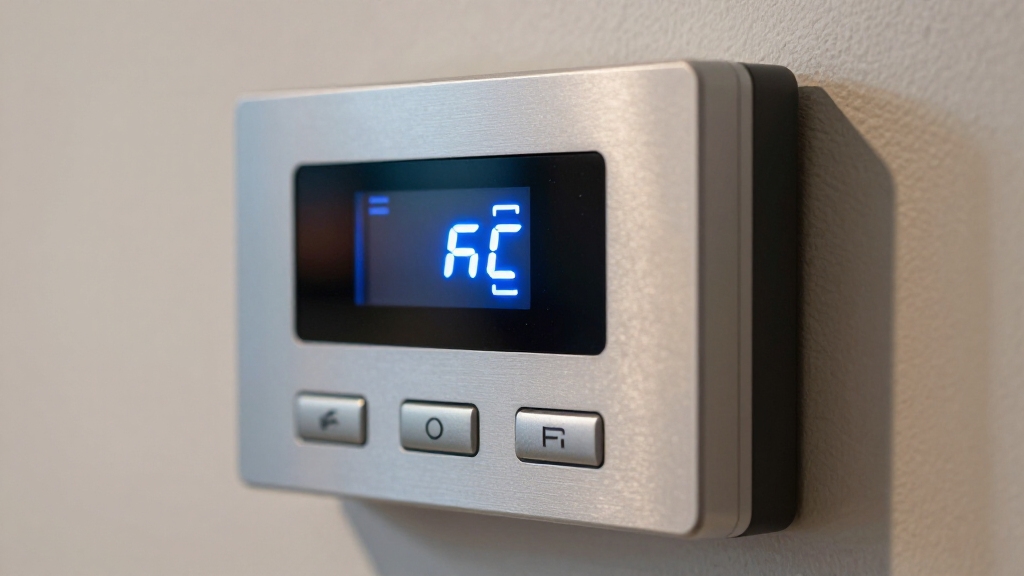
When you see “FC” on your alarm panel, it stands for “Failed to Communicate,” indicating that the panel couldn’t successfully send a signal to the monitoring center.
This alert means the control panel attempted transmission, but the monitoring service didn’t acknowledge receipt. You might also encounter “Comm Fail” on some systems, which signals the same issue.
Typically, this problem arises from disruptions in phone lines, cellular connections, or network paths. Importantly, FC highlights a communication fault, not a failure of your alarm sensors or sirens.
Your panel continuously tries to resend signals until communication is reestablished. Recognizing FC helps you understand that while local detection remains operational, remote monitoring and alerting are compromised until the communication link is restored.
If the communication fault persists, it is advisable to contact a licensed technician to perform troubleshooting and maintenance to restore full system functionality.
How Alarm Panels Send Signals?
Through various communication methods, alarm panels send critical signals to central monitoring stations to guarantee timely responses to events.
You’ll find panels commonly use phone lines, cellular networks, or internet connections to transmit alarm, supervisory, and trouble signals.
The panel encodes event data into digital messages, then sends them through the selected communication path.
Event data is digitally encoded and transmitted via the chosen communication channel for secure delivery.
It continuously monitors the communication status, retrying transmissions if acknowledgments aren’t received.
In IP-based systems, signals travel via routers and network infrastructure, while cellular communicators rely on mobile networks.
The panel’s programming dictates which paths to use and when to switch between them for redundancy.
This precise signaling process assures remote monitoring centers receive real-time updates, maintaining system reliability and rapid incident handling.
To ensure uninterrupted service, alarm panels often utilize alternative communication channels to preserve monitoring continuity during outages or failures.
Common Causes of FC Communication Failures
Several factors can trigger an FC (Failed to Communicate) message on your alarm panel, each impacting the system’s ability to transmit signals to the monitoring center.
You might face issues like damaged phone lines, cellular communicator faults, or internet outages that disrupt data flow. Additionally, outdated programming expecting a landline or monitoring-center connection problems can cause communication failures.
| Cause | Description |
|---|---|
| Phone Line Issues | Damage or disconnection stops signal transfer |
| Cellular/Network Failures | Faulty communicator or router outages |
| Programming Mismatches | System set to use unavailable communication |
Identifying these causes quickly helps you restore communication and maintain effective monitoring. For ongoing issues, it is important to consider scheduling service to restore system integrity and prevent prolonged vulnerabilities.
How FC Affects Your Alarm Panel’s Safety and Monitoring?
Although an FC (Failed to Communicate) message signals a transmission issue between your alarm panel and the monitoring center, it doesn’t necessarily compromise the panel’s ability to detect or respond to local events.
An FC message indicates transmission issues but does not affect local event detection or response by your alarm panel.
Your alarm panel continues to monitor sensors and triggers local alarms like sirens or strobes effectively.
However, the remote monitoring center doesn’t receive real-time alerts, which affects overall system monitoring.
Here’s what you should know about FC’s impact:
- Local detection remains fully operational, ensuring on-site alerting during emergencies.
- Remote notifications to your monitoring service are delayed or absent, reducing external response capability.
- The panel persistently attempts to resend signals until communication is restored, maintaining system integrity.
Promptly addressing communication failures is critical to maintaining system reliability and ensuring occupant safety.
Understanding this helps you balance immediate safety with monitoring limitations during FC conditions.
How to Fix FC and Restore Communication?
Even though your alarm panel continues to detect events locally during an FC condition, restoring communication guarantees your monitoring service receives timely alerts.
Start by checking physical connections: verify phone lines, cellular antennas, or internet cables are intact. Restart routers or network devices to reset IP communication.
If the problem persists, inspect panel programming to confirm it matches your communication path. Contact your alarm provider for advanced diagnostics or to update settings.
Regular maintenance, including checking for communication failures, helps prevent persistent trouble signals.
| Cause | Action | Result |
|---|---|---|
| Damaged phone line | Replace or reconnect | Restores landline signaling |
| Router outage | Restart or replace router | Reestablishes IP connection |
| Cellular failure | Check antenna or SIM, service | Resumes cellular transmission |
Frequently Asked Questions
Can FC Errors Cause False Alarms on My System?
FC errors themselves don’t cause false alarms since they indicate communication failure, not sensor faults. Your system still detects events locally and triggers alarms properly.
However, if the panel can’t communicate with the monitoring center, remote alerts won’t go through.
Does FC Affect Alarm Panel Battery Backup?
Does an FC error impact your alarm panel’s battery backup? No, it doesn’t.
FC indicates a communication failure, not a power issue. Your battery backup remains fully functional, supplying power during outages as designed.
However, while the battery keeps your system running locally, the FC error means remote signals won’t transmit until communication is restored.
How Often Should I Test My Alarm Panel Communication?
You should test your alarm panel communication at least once every three months to ensure reliable signal transmission to the monitoring center.
Regular testing helps identify issues like phone line damage, cellular faults, or network failures before they affect system performance.
Additionally, after any service or equipment changes, perform a communication test immediately.
Staying consistent with testing maintains your system’s integrity and guarantees prompt alerts in emergencies.
Can Weather Conditions Cause FC Messages?
You might think a hurricane could knock out your alarm communication forever. Sometimes weather can cause FC messages.
Severe storms, heavy rain, or lightning can disrupt cellular signals, damage phone lines, or cause internet outages that your panel relies on. While rare, these interruptions can trigger “Failed to Communicate” alerts.
To fix this, check your communication path after bad weather. Make sure all connections and devices are intact for reliable monitoring.
Is FC Covered Under My Alarm Service Contract?
Whether FC is covered under your alarm service contract depends on your provider and plan terms.
Typically, communication failures caused by equipment faults or service interruptions fall under your monitoring agreement.
However, issues due to external factors like weather or damaged phone lines may require additional fees or separate repair contracts.
You should review your contract details or contact your provider to confirm coverage specifics and any potential charges for resolving FC conditions.
What Does FC Mean on Alarm Panel? Final Thoughts
Understanding what FC means on your alarm panel is vital for maintaining reliable security communication.
While some believe FC errors always indicate hardware failure, this isn’t true. Most FC issues stem from signal disruptions or wiring problems.
By accurately diagnosing the root cause, you can restore proper communication quickly. Don’t ignore FC warnings; addressing them guarantees your alarm system stays responsive and keeps your property protected at all times.