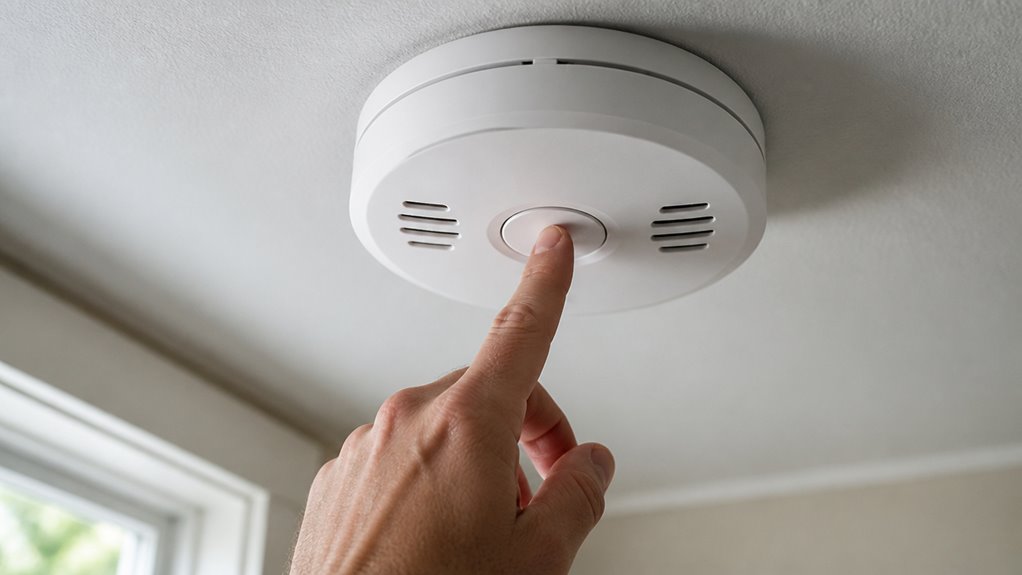

To test your Kidde smoke alarm, press and hold the Test/Hush button for at least five seconds until the full alarm sounds.
Stand an arm’s length away to confirm it reaches 85 decibels. For combo smoke/CO units, listen for the two-part alarm sequence.
If the alarm beeps briefly or fails entirely, press longer or replace the battery or unit.
Regular weekly tests and proper maintenance keep your alarm reliable.
Keep checking further for tips on troubleshooting, cleaning, and replacement.
Key Takeaways
- Press and hold the Test/Hush button on the Kidde smoke alarm for at least 5 seconds to trigger the full alarm sequence.
- Stand about an arm’s length away to verify the alarm sounds at 85 decibels during testing.
- Confirm the alarm emits three long beeps followed by “Fire! Fire!” for smoke-only Kidde models.
- Check that interconnected Kidde alarms sound simultaneously when testing one unit.
- If only a quick beep sounds, hold the button longer; replace the alarm if the full sequence fails.
How to Check Power and Battery on Your Kidde Smoke Alarm?
Before testing your Kidde smoke alarm, make sure the power source is properly connected and the battery is active.
Ensure your Kidde smoke alarm’s power source is secure and the battery is fully charged before testing.
Check that the green AC Power On Indicator light is steadily lit if your unit uses AC power.
For battery-operated alarms, pull the yellow battery tab fully out to engage the battery connection.
Remember, a quick flash every 30 to 45 seconds signals battery presence but doesn’t guarantee full functionality.
Replace batteries at least twice yearly or immediately if the unit chirps three times every minute, signaling cleaning or battery issues.
If the red light fails to illuminate during hush mode, replace the alarm promptly.
Always inspect the manufacture date on the back; replace units older than 10 years to ensure your smoke alarm operates reliably.
After any battery replacement or maintenance, press the test button to confirm a loud alarm and verify proper function, as part of routine maintenance and testing.
How to Test Your Kidde Smoke Alarm?
To test your Kidde smoke alarm, press and hold the Test/Hush button for at least 5 seconds until the full alarm sequence sounds. Stand about an arm’s length away, as the alarm reaches 85 decibels. This test confirms the device’s electronics and horn function properly.
Follow these steps to ensure thorough testing:
Press and hold the button to trigger the full alarm.
Verify the two-part alarm sequence on combination units.
Confirm interconnected alarms sound simultaneously.
If only a quick beep sounds, press and hold longer.
Replace the unit if the full alarm doesn’t activate.
Test your alarm weekly and address any irregularities immediately to maintain your home’s safety.
Remember to replace Kidde smoke alarm every 10 years to guarantee optimal sensor sensitivity and reliable detection.
What Your Kidde Alarm Sounds Mean During Testing?
Recognize the distinct sounds your Kidde alarm makes during testing to accurately interpret its status.
When you press and hold the Test/Hush button for 5 seconds, a smoke-only model emits three long beeps followed by “Fire! Fire!”
A combination smoke and carbon monoxide alarm triggers a two-part sequence: three long beeps plus a voice prompt, then four quick beeps with “WARNING! CARBON MONOXIDE!”
If you hear erratic or faint sounds, the unit may have electronic faults or a failing horn.
A quick press yields a brief beep to confirm button function without a full alarm.
If no sound occurs during testing, replace the alarm immediately.
Make certain interconnected units sound simultaneously to verify system integrity and your home’s safety.
For optimal safety, ensure the alarm’s green LED blinks every 60 seconds to confirm normal operation and continuous power.
How Often to Test and Clean Your Kidde Smoke Alarm?
You should test your Kidde smoke alarm weekly to make sure it functions properly and catches potential issues early. Regular testing helps you identify faults before they become dangerous.
Additionally, cleaning your alarm at least once a year prevents dust buildup that can impair sensor performance.
Follow these key maintenance guidelines:
Test the alarm by pressing and holding the Test/Hush button for at least 5 seconds.
Clean the unit using compressed air or a vacuum with a soft brush attachment annually.
Replace batteries at least twice a year, ideally during daylight saving time changes.
Listen for chirps every 30–60 seconds, signaling cleaning or replacement needs.
Replace the entire alarm every 5 to 10 years, based on the manufacture date.
Adhering to this schedule guarantees reliable, long-lasting protection.
If persistent beeping continues after battery replacement and cleaning, you may need to perform a reset procedure to restore normal function.
Troubleshooting Common Kidde Smoke Alarm Test Problems
Although Kidde smoke alarms are designed for reliability, occasional test failures can occur. If your alarm doesn’t sound during testing, first check the battery connection and replace old batteries.
Clean dust or debris from the sensor area using compressed air, as buildup can cause malfunctions. Also, verify the power indicator light is on for AC-powered units. If problems persist, reset the alarm by pressing the test button firmly.
| Problem | Cause | Solution |
|---|---|---|
| No sound during test | Dead battery | Replace battery |
| Weak or erratic alarm sound | Dust in sensor/horn | Clean with compressed air |
| No power indicator light | Power source disconnected | Check wiring or battery tab |
Replace the 9V battery immediately after a low-battery chirp to maintain alarm reliability.
When and How to Replace Your Kidde Smoke Alarm?
Since smoke alarms play a critical role in your home’s safety, replacing them promptly at the end of their service life is essential. Kidde alarms typically last 10 years; after this, the sensor becomes chemically dead and unreliable.
Watch for a chirp every 30 to 60 seconds. This signals end-of-life, not a low battery. If pressing the test button fails to trigger a full alarm, replace the unit immediately.
Follow these steps to replace your Kidde smoke alarm:
- Confirm the manufacture date on the back is over 10 years old.
- Turn off power or remove batteries before removal.
- Detach the old alarm from its mounting bracket.
- Install the new alarm, ensuring secure mounting and power connection.
- Test the new alarm thoroughly using the test button.
Kidde alarms come with integrated 10-year non-removable batteries that match the detector’s lifespan, ensuring long-term, maintenance-free power.
Frequently Asked Questions
Can I Use an Open Flame to Test My Kidde Smoke Alarm?
No, you shouldn’t use an open flame to test your Kidde smoke alarm. Doing so risks damaging the unit and could start a fire.
Instead, press and hold the Test/Hush button for at least 5 seconds to safely trigger the alarm sequence. This method guarantees you’re testing the alarm’s functionality without causing harm or danger.
Always follow manufacturer guidelines to keep your home safe and your alarm in proper working order.
How Do Interconnected Kidde Alarms Behave During Testing?
When you press the test button on one interconnected Kidde alarm, it’s like setting off a chain reaction. Every linked unit simultaneously sounds the full alarm sequence.
This guarantees your entire system is awake and responsive, not just a single device crying wolf. Stand back an arm’s length to protect your ears from the 85-decibel blast.
If any connected alarm stays silent, it signals a fault you need to address immediately.
What Does a Chirp Three Times Every 60 Seconds Indicate?
A chirp three times every 60 seconds indicates your Kidde smoke alarm needs cleaning.
You should remove dust and debris using compressed air or a vacuum with a soft brush attachment.
Don’t ignore this signal because buildup can interfere with sensor accuracy and cause false alarms.
Regular cleaning keeps your alarm reliable and responsive, ensuring your safety.
After cleaning, retest the unit to confirm it’s functioning properly.
How Long Does the Hush Mode Silence Nuisance Alarms?
Hush mode will silence nuisance alarms for 8 to 10 minutes. When you press the test button to activate Hush, the alarm temporarily pauses so you can address false triggers like cooking smoke.
During this period, the detector remains active but doesn’t sound. After the Hush time ends, the alarm automatically resets to full functionality, ensuring you don’t miss genuine threats while managing minor disturbances safely and effectively.
Who Do I Contact if My Kidde Alarm Fails Despite Fresh Batteries?
If your Kidde alarm fails to sound despite using fresh batteries, contact Kidde customer service immediately for assistance.
Call 1-800-880-6788 to report the issue and get guidance on troubleshooting or replacement options.
Don’t ignore the problem, as a non-functioning alarm compromises your safety.
Keep your unit’s model and manufacture date handy when you call to expedite support and verify warranty coverage.
Test, Clean, and Replace Your Kidde Smoke Alarm on Time
Testing your Kidde smoke alarm is like giving your home’s guardian a regular health check. It’s crucial for safety.
Always check the power and battery, perform the test as instructed, and understand the alarm sounds.
Clean and test it monthly to avoid surprises. If issues arise, troubleshoot promptly.
Replace your alarm every 10 years. Staying vigilant guarantees your Kidde smoke alarm remains a reliable sentinel, protecting your loved ones without fail.