
To maximize your security cameras’ effectiveness, mount them 8 to 10 feet high at all entry points. Angle slightly downward to capture clear facial details, and make certain fields of view overlap to eliminate blind spots.
Avoid aiming cameras toward direct sunlight or obstructions to prevent glare and image washout. Use weather-rated hardware, stable mounts, and secure power sources with backups.
Strengthen cybersecurity with encryption and network isolation. These strategic steps enhance coverage, reliability, and system protection. Explore further for more advanced insights.
Key Takeaways
- Mount cameras 8 to 10 feet high at all entry points to capture clear facial details and minimize tampering risks.
- Overlap camera views and angle lenses to eliminate blind spots and ensure continuous, seamless coverage.
- Avoid direct sunlight and obstructions to prevent glare and maintain clear image quality in all lighting conditions.
- Use weather-rated cameras with proper housing, surge protection, and dual power sources for reliable operation.
- Combine local and cloud storage with motion detection to optimize recording efficiency and enhance data security.
Where to Mount and Overlap Security Cameras for Best Coverage?
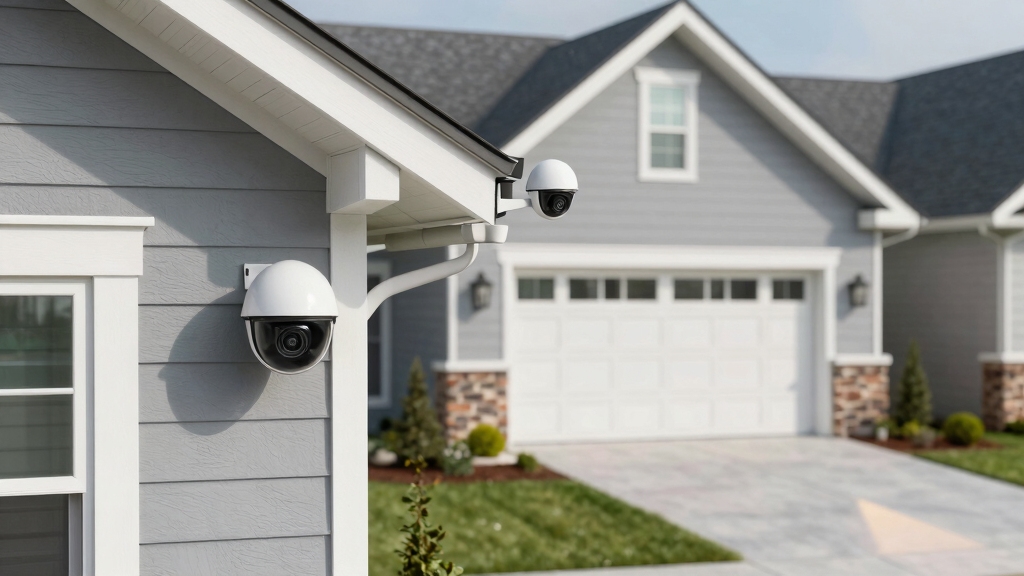
When mounting security cameras, you should position them 8 to 10 feet above the ground to capture clear facial details while minimizing the risk of tampering.
Mount security cameras 8 to 10 feet high for clear facial views and reduced tampering risks.
You’ll want to install cameras at all critical entry points: front, back, side doors, and garage entrances to guarantee thorough coverage.
Additionally, overlapping camera views is vital; aligning fields of vision eliminates blind spots and provides continuous monitoring of vulnerable areas.
Make sure each camera’s angle complements adjacent units, creating a seamless surveillance network.
By strategically placing cameras where they capture approach paths and perimeters, you enhance situational awareness and deter unauthorized access.
This methodical placement maximizes the efficacy of your security system, balancing clear identification capabilities with robust area coverage to safeguard your property effectively.
Mount camera brackets securely into stable surfaces and angle them slightly downward for optimal coverage and tamper resistance, following the optimal mounting height guidelines.
How to Position Cameras to Avoid Sun Glare and Obstructions?
Cameras frequently lose image clarity when positioned facing direct sunlight, causing glare and high contrast that obscure important details. To avoid this, position your cameras so they don’t face the sun during peak daylight hours.
Instead, mount them with the sun behind or to the side, minimizing lens flare and washout. Additionally, keep cameras clear of overhanging branches, bushes, or other obstructions that can block views over time.
Regularly inspect these areas to ensure nothing grows into the field of vision. Mounting cameras 8 to 10 feet high not only deters tampering but also helps maintain an unobstructed view. Proper maintenance and regular testing ensure continued optimal performance of security equipment, similar to monthly testing recommended for smoke detectors.
Optimizing Lighting and Weather Protection for Security Cameras
Ensuring clear visibility goes beyond avoiding sun glare and obstructions; proper lighting and weather protection play a significant role in capturing high-quality footage.
Position your cameras in well-lit areas or supplement with external lighting to enhance image clarity, especially during low-light conditions.
Opt for cameras equipped with Starlight or night vision capabilities to maintain visibility after dark.
To protect your investment, choose models with suitable climate ratings and install outdoor cameras under eaves or other sheltered spots to minimize exposure to rain, wind, and dust.
Angle cameras away from direct artificial or natural light sources to prevent lens washout and glare.
These measures will maximize footage quality and extend your camera’s lifespan, ensuring consistent surveillance performance regardless of environmental challenges.
Additionally, understanding hazardous waste handling protocols is essential when disposing of electronic components such as batteries or integrated circuits to ensure environmental safety.
How to Choose Reliable Hardware for Your Camera Setup?
Selecting reliable hardware starts with understanding the key components that influence system performance and longevity.
You should prioritize high-quality cables and connectors to guarantee stable signal transmission and minimize degradation.
Using junction boxes protects connections from environmental damage and keeps installations tidy.
Place DVR or NVR recorders in climate-controlled areas to prevent overheating and dust accumulation, which can impair functionality.
Conceal cables by routing them through attics or basements to reduce tampering risks.
During installation, test all connections thoroughly to identify issues early.
Additionally, choose cameras with appropriate climate ratings to withstand local weather conditions.
Mount cameras at a height of at least 10 feet to prevent tampering and improve coverage, ensuring optimal security and field of view through proper mounting best practices.
Protect Your Security System From Cyber Threats
Although physical security is crucial, overlooking cyber protection can leave your system vulnerable to unauthorized access and data breaches. You must secure your security cameras against hacking attempts that compromise privacy and integrity.
Neglecting cyber protection risks unauthorized access and breaches; securing cameras is essential to maintain privacy and integrity.
Start by selecting models with built-in encryption to protect video streams and stored footage. Use strong, unique passwords and enable two-factor authentication on associated cloud accounts. Isolate your cameras on a separate network to minimize exposure to other devices.
Regularly update your router’s firmware and guarantee wireless security uses WPA3 or WPA2 standards.
Choose cameras with encrypted data transmission.
Set strong, unique passwords; avoid defaults.
Enable two-factor authentication where possible.
Place cameras on a dedicated, isolated network.
These steps safeguard your system against cyber threats efficiently and reliably. Additionally, consider implementing network segmentation to limit potential lateral movement in case of a breach.
Power and Storage Management for Security Cameras
When it comes to keeping your security cameras up and running, having reliable power backup solutions is essential. Think about using uninterruptible power supplies and surge protectors. They really help ensure your cameras stay operational during outages or electrical disturbances.
But that’s not all. You also need to think about how you’re storing your footage. A solid approach is to combine local storage with cloud options. This way, you’re protecting your data from loss and ensuring you have access to it when you need it. Using motion detection triggers can further reduce unnecessary recordings, optimizing both storage and power usage.
Power Backup Solutions
Ensuring continuous power to your security cameras is vital to maintaining uninterrupted surveillance, especially during outages or power surges.
Without reliable backup solutions, you risk losing essential footage at vulnerable times.
To safeguard your system, consider integrating the following:
- Uninterruptible Power Supplies (UPS) that provide instant backup during outages, preventing downtime.
- Battery backups with surge protection to shield low-voltage components from electrical spikes.
- Dual power sources combining mains electricity with solar panels or batteries for redundancy.
- Power management devices that monitor voltage and automatically switch to backup power when needed.
Implementing these solutions guarantees your cameras remain operational regardless of power fluctuations, enhancing system reliability and security integrity.
Prioritize quality components and regular testing to confirm your backup strategies function flawlessly when called upon.
For remote or off-grid installations, pairing cameras with 12-watt solar panels can significantly extend runtime and reduce maintenance needs.
Reliable Footage Storage
Maximize the reliability of your security system by implementing robust footage storage solutions that safeguard critical video data against loss or corruption.
You should combine local storage with cloud backups to assure redundancy.
Employ uninterruptible power supplies (UPS) to maintain continuous recording during outages, and use surge protectors to shield equipment from power spikes.
Regularly monitor storage capacity to prevent data overwrites and maintain sufficient retention periods.
Using motion-activated recording can significantly extend storage retention by reducing unnecessary footage.
Here’s a comparison of storage options:
| Storage Type | Reliability | Cost Efficiency |
|---|---|---|
| Local HDD/NVR | High (offline) | Moderate |
| Cloud Storage | High (remote) | Variable |
| Hybrid Storage | Highest (redundant) | Higher upfront |
This approach guarantees footage availability, security, and long-term preservation.
How to Maintain Your Cameras for Long-Term Performance?
Regularly cleaning your security camera lenses is essential to maintain clear, unobstructed footage that accurately captures activity in monitored areas.
Neglecting this can lead to blurry or distorted images, reducing your system’s effectiveness.
To keep your cameras performing at their best over time, you should:
Gently wipe lenses with a microfiber cloth and lens cleaner to remove dust and smudges.
Inspect cables and connectors for wear or loose fittings to prevent signal loss.
Update camera firmware promptly to enhance functionality and patch vulnerabilities.
Test video feeds periodically to confirm consistent image quality and proper positioning.
Additionally, cleaning the lens regularly helps maintain optimal night vision functionality for clear images in low-light conditions.
Overlap Camera Angles to Eliminate Blind Spots
To really boost your security, consider overlapping camera angles. This approach helps eliminate blind spots and ensures that critical areas have continuous coverage. It’s all about strategic placement, right? Position those cameras to cover entry points and vulnerable zones, making sure their fields of view intersect.
When you’re installing the cameras, keep an eye out for potential blind spots. Identifying these spots early on lets you adjust angles or even add more cameras if needed. This way, you can maintain thorough surveillance and give yourself peace of mind. Using cameras with adjustable lenses and flexible mounts can help optimize coverage and minimize blind spots.
Benefits of Overlapping Coverage
Effectively overlapping camera angles eliminates blind spots and markedly strengthens your security coverage. When you design your system with overlapping fields of view, you guarantee continuous monitoring even if one camera’s view is obstructed or compromised.
This redundancy allows for better incident verification and reduces the risk of missing critical activity.
By overlapping coverage, you can:
- Capture detailed footage from multiple perspectives, improving identification accuracy.
- Maintain surveillance if one camera fails or is tampered with.
- Minimize shadows and blind zones caused by environmental obstacles.
- Enhance video analytics performance through richer visual data inputs.
This layered approach provides all-encompassing protection, making your security setup more resilient and reliable in detecting and deterring threats.
Strategic Camera Placement
Maximize your security coverage by strategically overlapping camera angles to eliminate blind spots. Position cameras 8 to 10 feet high to capture clear facial details while minimizing tampering risks.
Focus on covering all entry points: front, back, side doors, and garage with cameras whose fields of view intersect. This overlap guarantees continuous monitoring if one angle is obstructed.
Avoid pointing cameras directly into sunlight or near overhanging foliage that can degrade image quality. Make cameras visible to deter intruders effectively.
During installation, test each camera’s coverage area and adjust angles to maintain seamless overlap. By carefully planning placement, you create a robust interconnected system that maximizes surveillance efficiency and minimizes security vulnerabilities without wasting resources on redundant coverage.
Identifying Potential Blind Spots
When planning your security camera setup, identifying potential blind spots is crucial to ensure thorough coverage. You’ll want to analyze each camera’s field of view and guarantee overlapping angles that eliminate gaps.
Blind spots often arise near corners, beneath eaves, or behind obstacles, so methodical positioning is key. Overlapping coverage reduces vulnerability and provides multiple perspectives for critical areas.
Consider these strategies to identify and address blind spots:
Map out camera views to visualize coverage overlaps and gaps.
Adjust angles to cover entryways from different perspectives.
Avoid obstructions like foliage or architectural features blocking sightlines.
Use wide-angle or pan-tilt cameras in areas with complex layouts.
Frequently Asked Questions
How Do I Reset My Security Camera to Factory Settings?
To reset your security camera to factory settings, locate the reset button, usually a small pinhole on the camera or its base.
Press and hold it for about 10-30 seconds using a paperclip or similar tool until the indicator light blinks or changes color.
This action restores default configurations, erasing custom settings.
After resetting, you’ll need to reconfigure Wi-Fi, passwords, and other preferences to secure and optimize your system.
Can Security Cameras Be Integrated With Smart Home Systems?
Yes, you can integrate security cameras with smart home systems to enhance control and automation.
Many cameras support platforms like Alexa, Google Assistant, or Apple HomeKit, letting you view live feeds, receive alerts, and control settings via voice or app.
To guarantee seamless integration, choose cameras compatible with your existing smart devices.
Verify network security by using strong passwords and encryption to protect your connected system.
What Is the Average Lifespan of a Security Camera?
You might worry about frequent replacements eating into your budget, but the average lifespan of a security camera is typically 5 to 7 years.
With proper maintenance like cleaning lenses, updating firmware, and protecting against weather, you can extend this.
High-quality cameras with robust hardware and encryption often last longer, ensuring consistent performance and security.
Investing in durable models and regular upkeep ultimately saves you money and stress over time.
How Do I Securely Share Camera Footage With Law Enforcement?
To securely share camera footage with law enforcement, first make certain the footage is stored on encrypted devices or cloud services with strong passwords and two-factor authentication.
Export the relevant video in its original format to preserve integrity. Use secure transfer methods like encrypted USB drives or password-protected cloud links.
Always document the chain of custody and avoid sharing login credentials.
Communicate directly with law enforcement to confirm receipt and maintain confidentiality throughout the process.
Are There Legal Considerations for Recording Audio With Security Cameras?
Yes, you need to take into account legal restrictions on audio recording, which vary by jurisdiction.
Most places require consent from at least one or all parties before recording audio. You should research local wiretapping and privacy laws to avoid violations.
If you decide to record audio, clearly notify people in the area to guarantee transparency.
Ignoring these laws can lead to legal penalties, so it’s essential to comply and consult legal advice when needed.
Final Thoughts on Security Camera Tips
To maximize your security system’s effectiveness, mount and overlap cameras strategically. Position them to avoid glare and obstructions, and optimize lighting and weather protection.
Choose reliable hardware and safeguard against cyber threats. Manage power and storage efficiently, and maintain your equipment regularly.
By following these steps, you’ll guarantee all-encompassing coverage, enhanced reliability, and long-term performance. Protect your property, secure your peace of mind, and stay one step ahead of potential threats.