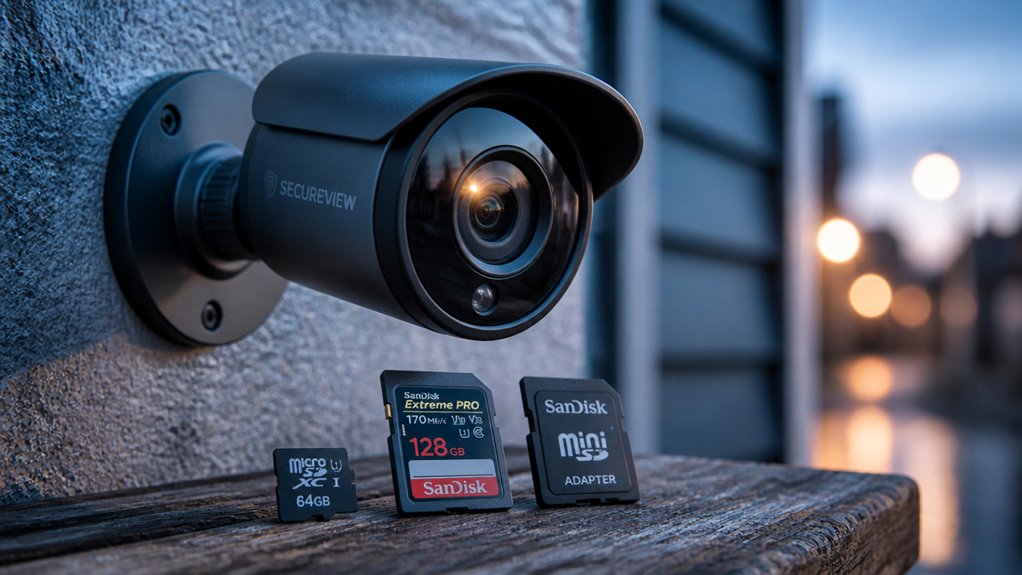

You should choose an SD card size based on your security camera’s resolution and recording mode. For motion-triggered 1080p cameras, 32GB to 128GB often suffices.
Continuous 4K recording can require 256GB to 512GB or more. Higher resolutions and continuous modes demand faster, high-endurance U3 cards.
Also, verify your camera’s maximum supported capacity and format to guarantee compatibility. Understanding these factors helps optimize storage and retention for your setup effectively.
Key Takeaways
- Choose 32GB–128GB cards for motion detection and 256GB–512GB for continuous recording, depending on resolution and retention needs.
- Higher resolutions like 4K require larger, faster, and more durable cards, typically 128GB or more, to handle storage and write demands.
- Verify your camera’s maximum supported SD card size in documentation to avoid compatibility issues and data loss.
- Use U3-rated, high-endurance cards for continuous recording to prevent frame drops and premature card failure.
- Format cards as specified (FAT32 or exFAT) and update firmware to ensure proper recognition and recording stability.
How Camera Resolution Determines SD Card Size Needs?
When choosing an SD card for your security camera, start by considering the camera’s resolution, as it directly impacts storage requirements.
Lower resolutions like 720p or 1080p consume notably less storage per hour compared to 4K.
Lower resolutions such as 720p or 1080p use significantly less storage per hour than 4K footage.
For instance, a 1080p camera can efficiently operate with a 128GB card, offering around 10 to 20 days of footage under moderate use.
In contrast, 4K cameras require much larger capacities, typically ranging from 128GB up to 512GB, to maintain practical retention times due to their higher bitrate and frame size.
You should also note that higher resolution footage demands faster and more durable cards to handle increased write cycles reliably.
Always verify your camera’s specifications to match SD card capacity with resolution for peak performance.
Additionally, video compression using codecs such as H.265 significantly affects storage efficiency and should be considered when selecting an SD card.
Choosing SD Card Size for Motion vs Continuous Recording
You’ll typically need different SD card sizes depending on whether your security camera records continuously or only when motion is detected. Continuous recording demands substantially more storage, so larger capacity cards, often 256GB or more, are necessary, especially for higher resolutions.
Motion-triggered recording compresses storage needs, allowing smaller cards like 32GB to 128GB to suffice, particularly with lower resolutions or less frequent motion.
| Recording Mode | Recommended SD Card Size | Use Case Example | Storage Duration Estimate |
|---|---|---|---|
| Motion Detection | 32GB – 128GB | Low traffic, 720p or 1080p | Up to several weeks |
| Continuous Recording | 256GB – 512GB | High traffic, 1080p or 4K | Few days to two weeks |
Choose based on your camera’s resolution, location traffic, and retention needs. Using efficient compression technologies can significantly reduce storage requirements without major loss of video quality.
Recommended SD Card Sizes for Indoor and Outdoor Security Cameras
When it comes to indoor security cameras, you’ll generally want an SD card size between 32GB and 128GB. The exact size you choose really depends on the resolution and recording mode you’re using. For instance, if you have a motion-triggered 1080p camera, going with a 128GB card usually works pretty well.
Now, let’s talk about outdoor cameras. They tend to need a larger capacity, so you’re looking at anywhere from 128GB to 512GB. This is especially true if you’re doing continuous recording or capturing higher resolutions like 4K. Choosing the right size is super important, as it ensures you have enough footage retention without sacrificing performance.
Wyze cameras support local microSD storage up to 32GB for continuous recording without subscription, but higher capacities may be needed depending on your recording settings and camera model, especially for outdoor use with models like the v3 or v4 that offer higher resolutions and advanced features such as H.265 compression.
Indoor Camera Storage Needs
Selecting the right SD card size for indoor security cameras hinges on balancing video resolution, recording mode, and storage duration requirements.
For basic 720p or 1080p indoor cameras using motion-triggered recording, 32GB to 64GB cards typically offer sufficient storage.
If you record continuously or require longer retention, a 128GB card is a practical starting point. It provides up to several weeks of footage depending on resolution and compression.
Higher-resolution 4K indoor cameras demand larger capacities, 128GB to 256GB cards, to accommodate increased data rates and longer storage needs.
Remember to verify your camera’s maximum supported SD card size and choose high-endurance, U3-class cards to guarantee reliable, smooth recording.
Efficient storage selection prevents data loss and optimizes performance for your indoor security system.
Additionally, choosing cameras with energy-efficient sensors can help extend battery life and reduce maintenance related to storage management.
Outdoor Camera Capacity
Managing storage for outdoor security cameras demands careful consideration of environmental factors, higher resolution needs, and recording modes.
You’ll find that outdoor cameras often require larger SD cards, typically 128GB to 512GB, due to continuous recording in high-traffic areas and 4K resolution video.
Motion-triggered recording can reduce storage demands, allowing 128GB cards for moderate 1080p use or 256GB for 4K footage.
However, constant recording and multi-camera setups increase capacity requirements, often necessitating 512GB cards.
Besides capacity, choose U3-class, high-endurance microSD cards to guarantee stable performance and durability under frequent rewriting.
Always verify your camera’s maximum supported card size in the manual, as exceeding limits can cause compatibility issues.
Properly balancing these factors guarantees reliable, long-term outdoor surveillance storage.
NVR systems often complement SD card storage by providing scalable channel capacity and centralized management for multi-camera setups.
How Multiple Cameras Change Your Storage Needs?
When you add multiple cameras to your security system, your total storage requirements increase substantially. Each camera continuously writes its own video data.
If you have two 1080p cameras recording motion-triggered footage, expect to double your base storage needs, typically from 128GB to 256GB.
For multi-camera setups involving 4K cameras, storage demands multiply even more. You may require 512GB or higher to maintain useful retention periods.
Also, consider the combined resolution, recording mode, and frequency of events captured by all cameras. You must calculate total capacity by summing each camera’s expected data output.
Keep in mind that exceeding your SD card’s capacity leads to overwriting older footage. Plan for sufficient storage to avoid losing critical recordings across your entire camera array.
Optimizing camera placement can reduce unnecessary footage and help manage storage more efficiently.
Speed and Endurance Requirements for Security Camera SD Cards
Because security cameras constantly write video data, you’ll need SD cards designed for frequent rewriting and high endurance. Standard SD cards may fail prematurely under continuous recording due to limited rewrite cycles.
Look for high-endurance cards built to withstand constant data streams, especially if your system records 24/7. Speed is equally critical; cards rated U3 or higher guarantee smooth handling of high-bitrate video, like 4K footage, preventing frame drops and corruption.
Lower-speed cards can bottleneck data flow, causing recording errors. Endurance ratings indicate the card’s ability to handle extensive rewrite cycles without degradation.
Prioritize cards that specify surveillance or high-endurance usage to maintain reliability and data integrity. Ultimately, balancing speed and endurance guarantees your security footage records uninterrupted and remains accessible over time.
In addition, ensuring the correct and secure identification of your camera through its unique device identifier helps maintain reliable device operation and data integrity.
Checking Your Camera’s Maximum Supported SD Card Size
To figure out the maximum SD card size your camera can handle, it’s important to check its specifications.
You know, different cameras have different limits—usually somewhere between 128GB and 512GB.
So, ensuring compatibility is key!
Always take a moment to look at the product documentation.
It’ll help you confirm that the SD card size you’re considering will work smoothly with your device.
Better safe than sorry, right?
Also, regularly updating your camera’s firmware can improve support for larger storage capacities and maintain optimal performance with your local storage.
Camera Model Specifications
Check your security camera’s documentation or settings to determine its maximum supported SD card size before purchasing storage. Camera models vary widely in their SD card capacity limits, typically supporting 32GB, 64GB, 128GB, 256GB, or 512GB cards.
This specification is vital because exceeding it can cause incompatibility or failure to store footage properly. Besides capacity, verify the supported card format. Most cameras use microSD cards formatted as FAT32 or exFAT, depending on size.
Confirm if your camera requires UHS speed class ratings like U3 for 4K or high-bitrate video. Some models also specify maximum endurance levels to guarantee reliable continuous recording.
Accurately identifying your camera’s supported SD card size and type assures peak performance and prevents data loss during surveillance.
Many models offer microSD support up to 128GB, which provides a simple local recording solution without relying on cloud storage.
Maximum Card Capacity
Although SD cards come in various sizes, your security camera supports only specific maximum capacities that guarantee proper functionality. Exceeding these limits may cause recording errors or incompatibility. Always verify your camera’s specifications before purchasing an SD card.
Key points to consider:
Maximum supported SD card size varies by camera model, commonly 128GB, 256GB, or 512GB. Higher-resolution cameras often require cards with larger capacities.
Continuous recording demands higher capacity than motion-triggered modes. Manufacturer documentation lists the exact maximum card size allowed.
Using a card beyond the supported size can lead to data corruption or device malfunction. Check your camera’s manual or official website to confirm the highest compatible SD card capacity for optimal performance.
For enhanced flexibility, some brands like Reolink support microSD and NVR compatibility to optimize local storage options beyond just SD cards.
Compatibility With SD Cards
Knowing the maximum supported SD card size for your security camera helps guarantee compatibility and reliable operation. You need to consult your camera’s technical documentation to determine the exact capacity it supports, commonly 128GB, 256GB, or 512GB.
Exceeding this limit can cause read/write errors or prevent the camera from recognizing the card. Additionally, consider your camera’s resolution and recording mode. Higher resolutions and continuous recording demand larger, high-endurance cards.
Most cameras use microSD cards, so make certain your card matches the format and speed class specified by the manufacturer, typically U3 for 4K footage. If you have a multi-camera system or require extended retention, verify if your setup supports external storage hubs. Some models allow expanded capacity beyond a single card’s limitation.
Frequently Asked Questions
Can SD Cards From Other Devices Work in Security Cameras?
Yes, SD cards from other devices can work in security cameras if they meet specific criteria: compatible format, supported capacity, and sufficient speed class.
You need to check your camera’s documentation for maximum card size and recommended speed ratings, like U3 for 4K video.
Using a card designed for frequent rewriting and high endurance guarantees stable performance.
Simply swapping cards without verifying these factors risks recording errors or data loss.
How Do Weather Conditions Affect SD Card Performance?
Weather conditions can significantly impact your SD card’s performance.
Extreme temperatures, both hot and cold, may cause data corruption or reduce card lifespan.
Moisture and humidity increase the risk of physical damage or short circuits, especially in outdoor cameras.
To maintain reliability, use high-endurance, industrial-grade cards rated for wide temperature ranges.
Also, make sure your camera’s enclosure offers proper weatherproofing to protect the SD card from environmental stressors.
What Is the Lifespan of a Security Camera SD Card?
The lifespan of a security camera SD card typically ranges from 3 to 5 years, depending on usage intensity and card quality.
Continuous recording and frequent rewriting shorten its life, so using high-endurance, U3-class cards designed for constant surveillance is essential.
You should monitor for errors or slowdowns and replace the card proactively to avoid data loss.
Proper environmental conditions and regular formatting also help extend its reliability.
Can SD Cards Be Encrypted for Security Cameras?
Yes, you can encrypt SD cards used in security cameras, but it depends on your camera and software capabilities.
Some cameras support built-in encryption for footage stored on the card, protecting data from unauthorized access.
If your camera lacks this feature, you can remove the card and use third-party tools on a computer to encrypt its contents.
Keep in mind, encryption may impact recording performance and compatibility, so verify supported encryption methods first.
How to Safely Transfer Footage From SD Cards to a Computer?
“Don’t put all your eggs in one basket.”
To safely transfer footage, first power off your security camera and remove the SD card carefully.
Use a reliable card reader connected directly to your computer to avoid connection drops.
Copy files to a secure, organized folder, then verify the transfer’s completeness.
Always eject the card properly before removing it.
Back up footage regularly to multiple locations to prevent data loss.
Avoid Storage Issues With the Right SD Card
Choosing the right SD card for your security camera is like picking the perfect fuel for a high-performance engine. Your camera’s resolution, recording style, and number of devices all shape the storage size you need.
Don’t forget to match speed and endurance specs to guarantee smooth operation. Always check your camera’s maximum supported card size to avoid compatibility issues.
With the right card, your security system will run efficiently, capturing every moment without missing a beat.