
You power a wireless security camera using batteries, electrical outlets, solar panels, or a combination for reliable operation.
Battery power offers mobility but requires regular charging or replacement.
Electrical outlets use adapters matched to the camera’s voltage and current specifications, typically 12V DC at 2A.
Solar panels with charge controllers can extend battery life by harnessing sunlight.
Proper solar positioning and adapter compatibility are critical.
Understanding these options helps you set up an efficient, continuous power solution tailored to your needs.
Key Takeaways
- Wireless security cameras often use battery power for true wire-free installation and mobility.
- Rechargeable batteries can be extended with integrated solar panels or hybrid solar-battery systems.
- Cameras can also be powered by 12V DC adapters or USB power supplies matching voltage and current needs.
- Regularly monitor and recharge batteries before depletion to maintain consistent camera operation and battery life.
- Proper solar panel placement and clean panels maximize charging efficiency for off-grid or remote camera setups.
Understanding Power Sources for Wireless Cameras
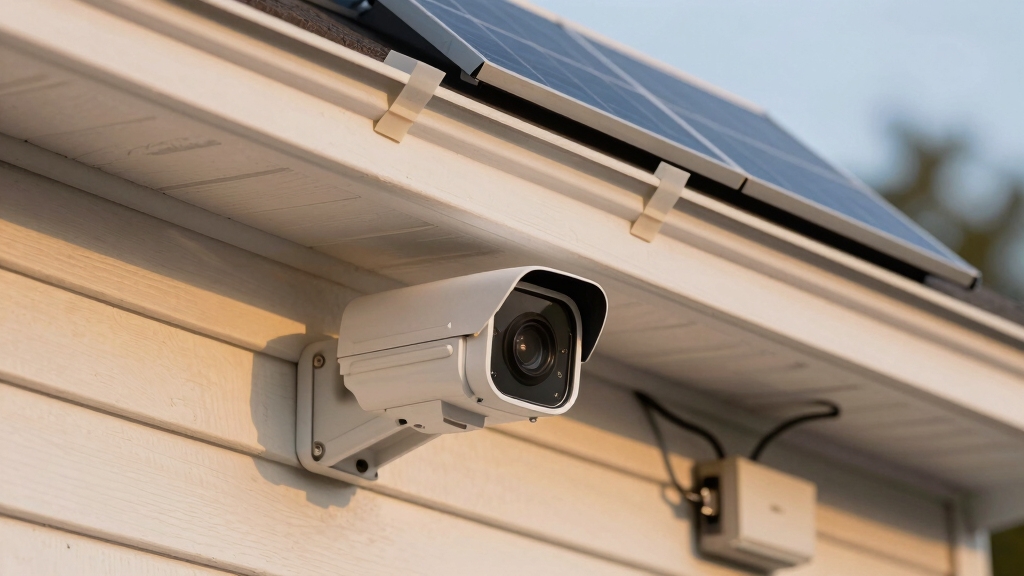
When selecting a wireless security camera, you need to understand the available power sources to guarantee consistent operation.
Wireless cameras primarily rely on three power categories: electric outlets, batteries, and solar panels.
Traditional wireless models still require a power cable connected to an electrical outlet, despite their wireless data transmission.
In contrast, wire-free cameras operate entirely without cables by using battery power, solar power, or a hybrid of both.
Battery-powered cameras offer true mobility but need regular charging and monitoring to prevent downtime.
Solar-powered systems use panels to recharge integrated batteries, enabling extended operation without electrical connections.
Understanding these power options lets you choose the best fit for your setup, balancing installation constraints, maintenance frequency, and environmental conditions for peak camera performance.
Pairing solar panels with rechargeable battery backups ensures continuous camera operation even during low sunlight or outages.
Powering Wireless Cameras From Electrical Outlets
Battery and solar options provide flexibility for wireless cameras, but many setups still depend on electrical outlets for continuous power.
You’ll typically connect your camera via a 12V DC wall adapter delivering 2A current, ensuring uninterrupted operation. For USB-powered models, a 5V voltage converter plugged into a standard outlet suffices.
When placing cameras distant from power sources, use extension cords rated for outdoor or indoor use accordingly. Matching your power adapter to the manufacturer’s voltage and current specifications is critical to avoid damage or malfunction.
To maintain operation during outages, consider integrating backup batteries or UPS systems. Proper wiring and secure connections prevent power loss and minimize electrical hazards.
This method guarantees stable energy delivery, supporting high-resolution and feature-intensive wireless cameras without interruption.
For optimal setup, ensure that power solutions include surge protection and stable voltage to safeguard your equipment.
Battery-Powered Wireless Security Cameras: Pros & Cons
Wireless security cameras powered solely by batteries offer a truly cable-free solution, freeing you from the constraints of nearby electrical outlets.
This autonomy simplifies installation and placement flexibility but requires diligent battery monitoring and periodic recharging or replacements.
Battery life varies with camera features and environmental conditions, which can limit continuous operation.
Some models incorporate solar panels to extend battery life and reduce manual charging needs.
| Advantage | Drawback | Consideration |
|---|---|---|
| Complete cable-free setup | Limited battery duration | Regular charging needed |
| Easy installation | Potential downtime during recharge | Affects high-res camera use |
| Portable and flexible | Battery replacement costs | Monitor battery health |
| No wiring complexity | Environmental impacts on battery life | Optimize settings for power |
You’ll need to balance convenience with maintenance to ensure reliable, uninterrupted surveillance.
How Solar Panels Boost Wireless Camera Battery Life?
Managing battery life can become a demanding task, especially with high-resolution cameras or remote installations.
Battery management is challenging, particularly for high-resolution cameras or remote monitoring setups.
Solar panels alleviate this by continuously charging the camera’s rechargeable battery using sunlight, extending operational time without relying on electrical outlets.
You’ll need proper panel placement to maximize sunlight exposure, ensuring efficient energy capture throughout the day.
This setup reduces dependency on grid power and allows your camera to maintain consistent energy storage even in locations where running power cables is impractical.
The solar system charges the battery during daylight, so your camera stays powered during nights or cloudy periods.
Using a high-efficiency solar panel can significantly reduce the amount of direct sunlight needed to keep your camera charged and operational.
Choosing the Right Voltage and Adapter for Wireless Cameras
Before you dive into picking an adapter for your wireless camera, it’s crucial to double-check the camera’s voltage requirements. You want to make sure everything’s compatible to avoid any potential damage.
Also, don’t forget about the current output! It should match or exceed your camera’s specifications to ensure it operates smoothly.
If you’re planning to power multiple cameras, consider using power splitters. These handy devices are designed to distribute the right voltage and current without overloading your power source. It makes life a lot easier!
Additionally, measuring voltage levels at the camera end can help confirm adequate power delivery and detect any voltage drops that may cause instability.
Matching Voltage Requirements
When selecting a power adapter for your security camera, it’s essential to match the voltage and current specifications exactly as outlined in the manufacturer’s manual.
Using an adapter with incorrect voltage can damage the camera or cause malfunctions. Most wireless cameras operate on either 12V DC or 24V AC, with some models requiring 5V USB power.
Verify the exact voltage and amperage your camera needs to ensure stable operation. The adapter must supply at least the minimum current rating specified without exceeding voltage limits.
Avoid assuming adapters are interchangeable; even small voltage deviations can impact performance. Confirm polarity and connector type match the camera’s input.
Proper matching guarantees continuous, reliable power delivery, protecting your investment and optimizing your wireless security system’s functionality.
Inspect power cables and connections regularly to ensure stable power delivery and prevent unexpected outages.
Adapter Compatibility Checks
Although selecting a power adapter may seem straightforward, assuring compatibility with your wireless security camera’s voltage, current, and connector specifications is critical to prevent damage and maintain consistent performance.
First, verify the voltage requirement. Most cameras use 12V DC, but some require 5V or 24V AC.
Next, check the current rating; your adapter’s output must meet or exceed the camera’s amperage demand, typically around 2A, to avoid underpowering.
Also, confirm the polarity and connector type to assure proper fit and electrical flow. Using an incompatible adapter risks overheating, malfunction, or permanent damage.
Always consult the manufacturer’s manual and opt for adapters with built-in protection features like short-circuit and overvoltage safeguards to secure reliable, continuous operation of your wireless security system.
For added safety and to prevent electrical faults, it is advisable to reconnect power supplies in the correct order, similar to the procedure of reconnecting battery terminals by attaching the positive cable first followed by the negative.
Using Power Splitters
Power splitters break out a single power source to feed multiple wireless security cameras. This optimizes installation efficiency and reduces the number of required outlets.
When using power splitters, you need to verify that the total current draw of all connected cameras doesn’t exceed the power supply’s capacity. Most wireless cameras operate at 12V DC, so make certain your splitter and adapter match this voltage and provide sufficient amperage, typically 2A per camera.
Use splitters with proper connectors to maintain stable voltage across each camera. This prevents voltage drops that could impair performance. Always consult the manufacturer’s specifications to confirm voltage and current requirements.
Properly selected power splitters streamline wiring and enhance system reliability. This ensures all cameras receive consistent power without overloading the adapter or causing voltage fluctuations.
Keep in mind that wireless cameras require ongoing maintenance like battery charging or solar panel upkeep, which differs from the wired systems’ power delivery considerations, making battery management an important factor in overall system reliability.
Maintaining Wireless Camera Batteries for Longer Life
Regularly monitoring and managing your wireless camera’s battery can markedly extend its operational lifespan.
You should routinely check battery levels and recharge before depletion to prevent capacity loss.
Use the manufacturer’s recommended charger to maintain ideal voltage and current, avoiding under- or overcharging.
Store batteries in environments between -10°C and 55°C to prevent degradation.
Reducing video resolution to 720p–1080p and minimizing night-vision use lowers power consumption, preserving battery life.
If your camera supports it, enable power-saving modes and maintain stable wireless connectivity to avoid excessive power draw.
Replace aging batteries promptly to guarantee consistent performance.
Additionally, using models with solar charging options can significantly extend battery life by supplementing power with sunlight.
Combining Battery and Solar Power for a Wire-Free Setup
Managing battery health effectively helps maintain reliable wireless camera operation. Relying solely on batteries can limit uninterrupted use.
Combining battery and solar power guarantees continuous energy supply without wiring. Solar panels recharge batteries throughout the day, extending runtime and reducing manual charging needs.
This hybrid setup suits remote or outdoor locations where power outlets are unavailable or costly to install.
Consider the benefits of combining power sources:
| Aspect | Battery Only | Solar + Battery |
|---|---|---|
| Runtime | Limited by battery | Extended via solar |
| Maintenance | Frequent charging | Reduced charging |
| Installation Flexibility | Moderate | High (wire-free) |
Proper solar panel positioning is essential to maximize sunlight absorption and ensure consistent battery charging throughout the year.
Positioning Solar Panels for Best Efficiency
When installing solar panels for your wireless security camera, you’ll want to place them where they receive maximum direct sunlight throughout the day.
Ideally, position the panel facing true south in the Northern Hemisphere or true north in the Southern Hemisphere to optimize solar exposure.
Tilt the panel at an angle equal to your latitude to capture the most sunlight year-round.
Avoid shading from trees, buildings, or other obstructions, as even partial shade can greatly reduce efficiency.
Secure the panel on a stable mount that allows for minor seasonal adjustments if possible.
Additionally, make certain the solar panel’s wiring runs directly to the battery or camera without excessive length to minimize voltage drop.
This ensures consistent power delivery for reliable operation.
Fixing Common Power Problems in Wireless Security Cameras
If you’re dealing with common power problems in your wireless security cameras, the first step is to tackle battery drain. Make it a habit to regularly check the battery levels and recharge them on time. It’s a simple way to keep everything running smoothly.
Next up, take a good look at all your power connections. You want to make sure they’re secure and that your setups are compatible with the right voltage. This helps to avoid any annoying interruptions in power.
And don’t forget about solar charging! To get the most out of it, check the placement of your solar panels. Also, keep those surfaces clean to ensure they’re capturing as much energy as possible. It really makes a difference!
—
Let me know if you need anything else!
Battery Drain Solutions
Frequently, battery drain poses a critical challenge for wireless security cameras, undermining their reliability and continuous monitoring capabilities.
To address this, you should optimize camera settings, monitor battery health, and implement efficient charging practices. Lowering resolution and disabling unnecessary features reduce power consumption.
Regularly check and replace batteries before depletion to prevent damage. Solar charging integration can extend battery life substantially.
| Solution | Action | Benefit |
|---|---|---|
| Optimize Settings | Reduce resolution, disable LEDs | Decreases power use |
| Battery Monitoring | Check voltage, replace timely | Prevents unexpected shutdowns |
| Efficient Charging | Use recommended adapters | Maintains battery health |
| Solar Integration | Install panels with batteries | Extends operational duration |
| Environmental Control | Avoid extreme temperatures | Prolongs battery lifespan |
These steps methodically mitigate battery drain for consistent camera operation.
Power Connectivity Issues
Power connectivity issues can throw off your wireless security camera’s performance by disrupting the steady flow of electricity needed for operation.
Start by verifying that the power adapter matches your camera’s required voltage and current, usually 12V DC at 2A.
Inspect cables for wear, loose connections, or damage, as these often cause intermittent power loss.
If using extension cords, make certain they’re rated for outdoor use and deliver adequate current.
For battery-powered models, monitor charge levels regularly and avoid letting batteries drain completely.
Consider backup power options like UPS systems in areas with frequent outages.
Finally, keep connectors clean and dry to prevent corrosion.
Addressing these factors methodically restores reliable power connectivity and maintains consistent camera functionality.
Solar Charging Optimization
When optimizing solar charging for your wireless security camera, ensuring proper solar panel placement is critical to maximize sunlight exposure throughout the day. Position panels facing true south in the northern hemisphere with a tilt angle matching your latitude.
Avoid shading from trees or structures. Monitor battery voltage regularly to assess charging efficiency and adjust panel orientation seasonally. Use quality charge controllers to prevent overcharging and extend battery life.
| Optimization Factor | Recommended Action |
|---|---|
| Panel Orientation | Face true south with correct tilt |
| Shading Avoidance | Clear obstructions from sunlight |
| Battery Monitoring | Check voltage weekly |
| Charge Controller | Use MPPT or PWM models |
| Seasonal Adjustments | Reorient panels as needed |
How to Optimize Power and Extend Wireless Camera Runtime?
Optimizing your wireless camera’s runtime involves managing power consumption and maintaining battery health proactively.
First, reduce video resolution to 720p or 1080p to lower energy demand without compromising essential image quality.
Next, position the camera to avoid low-light conditions that trigger excessive power use due to infrared or night vision activation.
Monitor battery levels regularly and recharge batteries before full depletion to preserve longevity.
If using solar power, make certain panels receive maximum sunlight exposure by adjusting their angle and removing obstructions.
Minimize connectivity issues by maintaining a strong wireless signal, as weak signals increase power draw.
Finally, operate cameras within recommended temperature ranges (-10°C to 55°C) to prevent accelerated battery degradation and maintain peak runtime.
Frequently Asked Questions
Can Wireless Security Cameras Work During a Power Outage Without Backup Power?
No, wireless security cameras won’t work during a power outage unless you provide backup power.
Even though they transmit data wirelessly, most still rely on a constant power source from an outlet.
Without a UPS, generator, or battery backup, your camera will shut down when the electricity cuts off.
To maintain surveillance during outages, you need to install a reliable backup power system or use battery-powered or solar-powered models with stored energy.
How Does Weather Impact Wireless Camera Performance and Power Consumption?
Weather directly affects your wireless camera’s performance and power use.
Extreme temperatures between -10°C and 55°C prevent damage. Outside this range, battery efficiency drops, reducing operational time.
Low light conditions force the camera to work harder, increasing power consumption.
Rain, fog, or snow can degrade signal quality, causing connectivity issues that also raise energy use.
Proper installation and weatherproofing minimize these impacts, ensuring stable power and consistent performance.
Are There Specific Safety Precautions for Installing Outdoor Solar-Powered Cameras?
Yes, you should mount your outdoor solar-powered camera where it gets maximum sunlight, avoiding shade.
Secure all wiring to prevent tripping or damage. Use weatherproof connectors and enclosures to protect electrical components from moisture.
Ground the system properly to reduce electrical hazards. Regularly inspect for corrosion or loose connections.
Finally, follow the manufacturer’s voltage and installation guidelines precisely to guarantee safe, reliable operation in outdoor conditions.
What Are the Signs of a Failing Battery in a Wireless Security Camera?
Noticing frequent shutdowns or shorter recording times? Those are clear signs your wireless security camera’s battery is failing.
You’ll also see delayed startup, inconsistent video quality, or warning alerts about low power.
If the battery drains faster than usual despite regular charging, it’s time to replace it.
Regularly monitoring battery health and avoiding full discharges can help maintain reliability and prevent unexpected downtime.
Don’t ignore these symptoms.
Can Power Splitters Cause Issues With Camera Connectivity or Performance?
Yes, power splitters can cause issues with camera connectivity or performance if they don’t deliver the correct voltage or current.
You need to guarantee the splitter matches your camera’s power requirements precisely. Insufficient power can lead to intermittent operation, reduced image quality, or device resets.
Always verify the splitter’s specifications and use high-quality cables to maintain stable power. This helps prevent signal degradation that might affect your camera’s performance.
Choose the Right Power Source for Reliable Coverage
Powering your wireless security camera is like fueling a vigilant guardian.
Whether plugging into an outlet, relying on battery strength, or harnessing solar rays, selecting the right voltage is key.
Positioning solar panels like sun-catching sails and troubleshooting power glitches swiftly guarantees uninterrupted watchfulness.
Combining power sources methodically extends runtime, keeping your system alive and alert.
With these precise steps, you’ll maintain a seamless, wire-free vigil, protecting your space with unwavering energy.