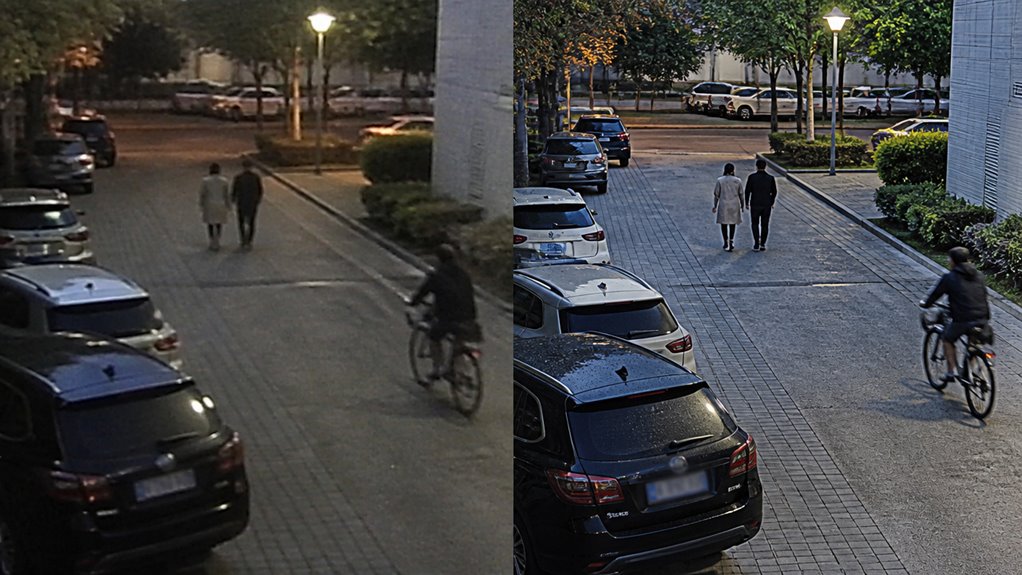

When choosing between 1080p and 2K security cameras, you’ll find 2K offers nearly 75% more pixels. This delivers sharper images and finer detail, which is crucial for facial recognition and forensic analysis.
However, 2K demands roughly double the storage, bandwidth, and cost compared to 1080p. While 1080p suits basic monitoring and smaller setups, 2K excels in identification-critical environments and wider coverage.
Understanding these trade-offs helps you balance quality, cost, and system capabilities for your security needs.
Key Takeaways
- 2K cameras offer roughly 75% more pixels than 1080p, providing clearer, sharper images with better detail and digital zoom capabilities.
- 2K resolution enhances facial recognition and forensic analysis by preserving finer details during digital zoom compared to 1080p.
- 2K footage demands about 1.7 times more storage and roughly doubles bandwidth requirements versus 1080p, impacting system performance and cost.
- 1080p cameras are more affordable and suitable for basic monitoring, while 2K is ideal for identification-critical environments needing fine detail.
- Higher upfront and operational costs of 2K cameras can be justified by improved security outcomes and enhanced post-event analysis capabilities.
1080p vs 2K Security Camera Comparison: Image Quality, Storage, and Cost
| Comparison Point | 1080P Security Camera | 2K Security Camera | Best Choice |
|---|---|---|---|
| Resolution | Records at 1920 × 1080 pixels | Records at 2560 × 1440 pixels | 2K for higher resolution |
| Pixel Count | Around 2.1 million pixels per frame | Around 3.7 million pixels per frame | 2K for more detail |
| Image Clarity | Good for basic monitoring and small areas | Provides sharper, clearer images | 2K for clearer footage |
| Facial Recognition | May lose detail at distance or when zoomed | Better for facial features and object clarity | 2K for identification |
| Digital Zoom | Detail breaks down faster when zooming | Retains more detail during digital zoom | 2K for post-event review |
| Storage Need | Uses less storage for continuous recording | Needs roughly 1.7 times more storage | 1080P for storage savings |
| Bandwidth Use | Lower bandwidth demand, usually easier on networks | Higher bandwidth demand for live viewing and remote access | 1080P for limited networks |
| Cost | More affordable for budget setups | Usually costs more due to higher image quality | 1080P for lower cost |
| Best Use Case | Small rooms, basic monitoring, budget security systems | Entry points, driveways, wider areas, detail-critical zones | Match to security priority |
| Overall Value | Best for simple surveillance and efficient recording | Best for sharper evidence and better identification | Choose by coverage needs |
What Are the Key Differences Between 1080p vs 2K Security Cameras?
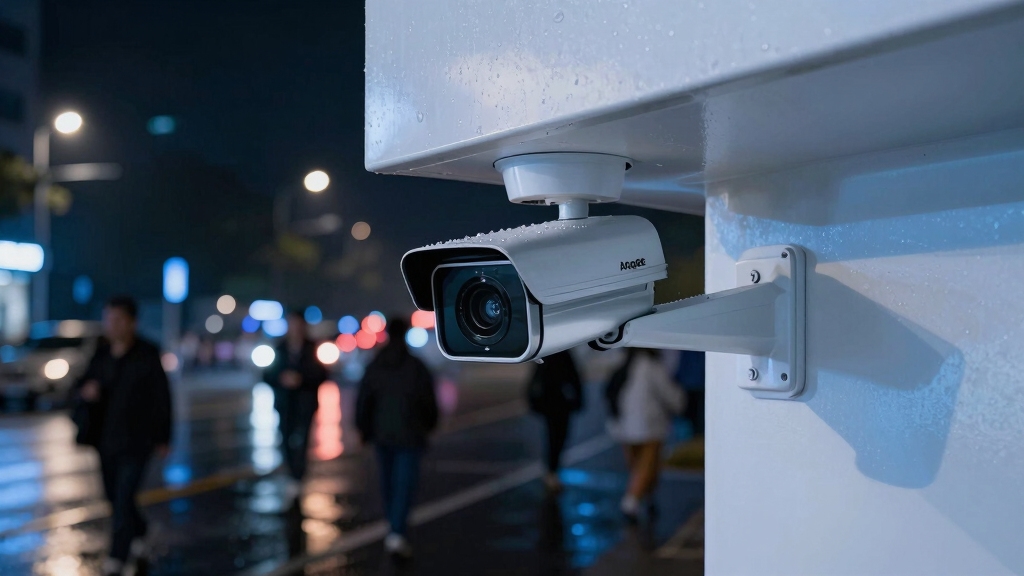
When comparing 1080p and 2K security cameras, the most significant difference lies in their resolution: 1080p records at 1920 × 1080 pixels, while 2K captures footage at 2560 × 1440 pixels.
This means 1080p offers about 2.1 million pixels per frame, whereas 2K provides roughly 3.7 million pixels, which is nearly 75% more.
You’ll notice that 2K’s higher pixel count translates to increased image sharpness and finer detail capture.
Technically, 2K cameras are classified as QHD or 1440p, making them a distinct step above standard Full HD.
While the term “2K” can vary, in security systems it consistently refers to this 2560 × 1440 resolution.
Understanding these pixel differences helps you evaluate which camera suits your surveillance needs based on image clarity and detail density.
Keep in mind that higher resolution cameras like 2K models typically come with increased upfront costs and may require more storage and bandwidth.
Why Resolution Matters for Clear Security Footage and Detail?
You’ll really notice how much sharper images from 2K cameras are compared to 1080p. They offer nearly double the pixel count, which means you get a lot more clarity.
This higher resolution makes it way easier to identify faces and objects because it keeps those finer details intact, especially when you’re looking at things from a distance or if you have to zoom in.
However, higher resolution also requires more processing power and bandwidth to maintain smooth frame rates and video quality.
Image Clarity Comparison
Image clarity hinges on resolution because the number of pixels directly determines the level of detail captured in security footage.
When you compare 1080p and 2K cameras, the pixel count difference markedly affects image sharpness and detail fidelity.
You’ll notice 2K footage delivers clearer, crisper images, making subtle features more distinguishable.
| Feature | 1080p (1920×1080) | 2K (2560×1440) |
|---|---|---|
| Total Pixels | ~2.1 million | ~3.7 million |
| Image Sharpness | Standard clarity | Enhanced clarity |
| Zoom Quality | Loses detail fast | Retains detail |
| Detail Level | Basic monitoring | Fine detail |
Choosing 2K improves image clarity, essential for detailed surveillance tasks. Additionally, cameras with larger sensor sizes often paired with higher resolutions like 2K provide better low-light performance and reduced image noise.
Detail Impact on Identification
Higher resolution directly enhances your ability to identify individuals and objects in security footage by capturing more intricate details.
With 2K cameras offering about 3.7 million pixels per frame compared to 2.1 million pixels in 1080p, you get markedly sharper images.
This higher pixel density allows you to distinguish facial features, read labels, and recognize objects more reliably, especially at a distance.
When you zoom in digitally on 1080p footage, detail degrades quickly, but 2K maintains clarity, enabling effective post-event analysis.
This makes 2K cameras superior for environments where precise identification is critical.
However, you must balance this with increased storage and bandwidth demands.
Models like the Argus 3 Pro deliver reliable 2K resolution while supporting local storage options to manage increased data effectively.
Ultimately, if your priority is clear, actionable footage for identification, upgrading to 2K provides measurable advantages over 1080p.
How 2K Cameras Improve Facial Recognition and Object Clarity?
You’ll see that 2K cameras really step up the game when it comes to detail. With their higher pixel count, they boost resolution, which is super helpful for facial recognition and object clarity.
When you zoom in on 2K footage, something interesting happens: it keeps its sharpness way better than 1080p. This means you can still see those critical identification features clearly.
This sharper image quality? It makes it so much easier to distinguish facial characteristics and even small objects. That’s a big win for security applications!
Additionally, combining 2K resolution with AI algorithms enhances the accuracy of identifying faces and objects in complex scenes.
Enhanced Detail Resolution
Because 2K cameras capture roughly 3.7 million pixels per frame, almost double that of 1080p models, they deliver markedly enhanced detail resolution. This directly improves facial recognition and object clarity.
You’ll notice finer texture, sharper edges, and more distinct facial features, enabling more accurate identification in security footage. The increased pixel density allows subtle characteristics, like eye shape or small objects, to appear clearer and less pixelated.
This precision aids forensic analysis and reduces ambiguity when reviewing incidents. Unlike 1080p’s 2.1 million pixels, 2K resolution captures considerably more visual data without upscaling, preserving native image integrity. However, it is important to consider that higher resolution requires greater bitrate and storage, which can impact recording and network performance.
Improved Zoom Clarity
Zooming in on security footage often reveals the limits of resolution. However, 2K cameras retain considerably more detail during digital zoom than 1080p models.
With approximately 3.7 million pixels per frame, 2K footage provides a denser image matrix. This allows you to magnify specific areas without rapid degradation in clarity.
In contrast, 1080p’s 2.1 million pixels spread over the same scene result in pixelation when zoomed. This increased pixel count in 2K enables you to better distinguish fine object details and improve the legibility of visual information after zoom.
Consequently, 2K cameras enhance your ability to conduct post-event analysis, especially when subjects are at a distance or partially obscured. The superior zoom clarity ultimately supports more reliable identification compared to 1080p surveillance systems.
Additionally, some 2K models include AI-driven alerts which further enhance detection accuracy and help focus on critical events.
Clearer Facial Features
Building on the improved zoom clarity of 2K footage, these cameras also deliver markedly clearer facial features and object details.
With approximately 3.7 million pixels per frame compared to 2.1 million in 1080p, 2K cameras capture finer nuances in facial contours, skin textures, and expressions.
This enhanced pixel density reduces pixelation when you zoom in, allowing for more accurate facial recognition and identification.
You’ll also notice improved object clarity, making labels, accessories, or distinguishing marks easier to discern at a distance.
In contrast, 1080p often blurs or loses critical details under similar conditions.
Additionally, proper camera positioning and secure mounting are essential to maintaining this clarity and preventing blind spots.
How Zoom Quality Compares: 1080p vs 2K Security Cameras?
When you enlarge footage from security cameras, the amount of detail preserved becomes critical for effective identification.
2K cameras retain markedly more image information during digital zoom compared to 1080p cameras. The latter quickly lose clarity due to their lower pixel count. This difference impacts your ability to analyze zoomed-in footage accurately.
Here’s why 2K zoom outperforms 1080p:
- Higher Pixel Density: With 3.7 million pixels versus 2.1 million, 2K provides finer detail when zoomed, reducing pixelation.
- Improved Identification: Zoomed 2K footage preserves facial features and object details better, aiding forensic review.
- Longer Digital Zoom Usability: 2K maintains clarity over greater zoom levels, extending effective observation range beyond 1080p limits.
Choosing 2K enhances your zoom quality, enabling more precise post-event analysis and identification. Many advanced cameras also leverage H.265 video compression to efficiently manage bandwidth without sacrificing quality during zoomed video playback.
Storage and Bandwidth Needs for 1080p vs 2K Video
While 2K footage offers superior zoom quality and detail retention, these advantages come with increased demands on storage and bandwidth.
You’ll notice that 2K video files are roughly 1.7 times larger than 1080p files due to the higher pixel count: 3.7 million versus 2.1 million per frame.
This means you need more storage capacity to retain the same recording duration.
Bandwidth requirements also increase markedly; 1080p streams typically consume 2–4 Mbps, whereas 2K streams demand 4–8 Mbps, doubling network load during live viewing or remote access.
If your system or network infrastructure has limited capacity, this could impact performance or raise costs.
Consequently, you must weigh the improved image detail against your available storage and bandwidth resources when choosing between 1080p and 2K cameras.
Choosing an NVR system with IP cameras encoding can help manage these higher data demands more efficiently.
Comparing Costs of 2K and 1080p Security Cameras
Evaluating the cost differences between 2K and 1080p security cameras reveals key considerations for your budget and surveillance needs.
While 1080p cameras are generally more affordable, 2K models command higher prices due to superior resolution and enhanced image quality. The price gap, however, has been narrowing as technology advances.
Consider these factors when comparing costs:
- Initial Purchase Price: 2K cameras typically cost 20-40% more than 1080p units, reflecting hardware and sensor improvements.
- Storage and Bandwidth Expenses: 2K footage demands more storage and higher bandwidth, increasing ongoing operational costs.
- Value for Identification Detail: If your surveillance requires finer detail, 2K’s extra cost may justify itself through improved security outcomes.
Balancing these elements helps you make a cost-effective, performance-driven camera choice.
When Is 1080p Security Footage Good Enough?
You’ll often find 1080p security footage sufficient for basic monitoring tasks where broad scene awareness matters more than fine detail.
If you’re monitoring small spaces or entryways, 1080p delivers clear overall views without overwhelming storage. Its lower bandwidth and file size suit continuous recording and budget-conscious setups.
However, it’s less effective for detailed identification or zoomed-in inspections.
| Scenario | 1080p Suitability | Reason |
|---|---|---|
| Small indoor areas | High | Adequate detail, low storage |
| General perimeter monitoring | Moderate | Good overview, limited zoom |
| Long-distance facial ID | Low | Insufficient resolution |
| Bandwidth/storage constrained | High | Smaller files, less network load |
Use 1080p when wide coverage and efficiency matter more than granular detail.
Best Scenarios to Upgrade From 1080p to 2K Cameras
Whenever your surveillance needs demand finer detail for identification or enhanced zoom capabilities, upgrading from 1080p to 2K cameras becomes essential. The increased resolution of 2K (2560 × 1440) provides about 75% more pixels than 1080p, markedly improving image clarity and zoom performance.
Consider these scenarios to upgrade:
1. Identification-critical environments
When facial recognition or license plate reading is a priority, 2K guarantees sharper detail and higher accuracy.
2. Larger or mid-sized properties
Wider coverage areas benefit from 2K’s finer resolution, maintaining image quality across broader fields of view.
3. Post-event analysis needs
If you rely on digital zoom for investigative review, 2K footage preserves essential detail better than 1080p, aiding precise object or person identification.
Upgrading in these contexts enhances security effectiveness through superior image resolution and actionable detail.
Balancing Budget, Quality, and Coverage in Your Camera Choice
Balancing budget, quality, and coverage requires a strategic approach to selecting security cameras that meet your specific needs without overspending.
You need to evaluate the resolution requirements based on your monitoring area and identification needs. If you prioritize detailed facial recognition or object clarity, investing in 2K cameras is justified despite higher costs and storage demands.
Conversely, 1080p cameras suffice for basic coverage in smaller spaces, offering cost-effective operation with lower bandwidth usage. Coverage area also influences your choice: larger zones benefit from 2K’s enhanced resolution and zoom capabilities, while compact areas align well with 1080p.
Ultimately, weigh initial investment against ongoing storage and network expenses to optimize security performance and budget constraints. This ensures your setup delivers precise monitoring without unnecessary overspend.
Frequently Asked Questions
Can 1080p and 2K Cameras Work Together in the Same Security System?
Yes, you can use 1080p and 2K cameras together in the same security system.
Your system’s DVR or NVR must support mixed resolutions to handle different streams simultaneously.
Just keep in mind that managing bandwidth and storage becomes essential, as 2K footage demands more resources.
Mixing resolutions lets you optimize costs and coverage, deploying higher-res cameras where detail matters and 1080p elsewhere without compatibility issues.
How Do Lighting Conditions Affect 1080p Versus 2K Camera Performance?
You’ll notice 2K cameras capture roughly 76% more pixels than 1080p, enhancing detail in low-light scenarios.
While both struggle with poor lighting, 2K’s higher pixel count improves image clarity and noise reduction.
This makes faces and objects easier to identify in dim conditions.
However, without adequate infrared or supplemental lighting, neither will perform at their best.
Are There Differences in Installation Complexity Between 1080p and 2K Cameras?
You won’t face significant differences in installation complexity between 1080p and 2K cameras.
Both typically use similar mounting hardware and wiring standards.
However, 2K cameras might require more careful network planning due to higher bandwidth needs.
This could complicate setup if your infrastructure is limited.
Aside from that, physical installation steps, power requirements, and mounting procedures remain largely the same.
Your installation process won’t be markedly harder with 2K.
Do 2K Cameras Require Special Software for Playback and Analysis?
No, 2K cameras don’t require special software for playback and analysis beyond what’s typical for modern security systems.
You can usually use the same video management software (VMS) or player that supports your 1080p footage.
However, make sure your software handles higher resolution files smoothly to avoid lag.
Advanced analytics might benefit from updated or dedicated software optimized for 2K’s increased pixel data and detail, but basic playback remains compatible.
How Do Weather Conditions Impact 1080p and 2K Outdoor Camera Durability?
As they say, “Don’t judge a book by its cover.”
Weather impacts both 1080p and 2K cameras similarly regarding durability.
You’ll want to make certain your camera has robust IP ratings for water and dust resistance.
Extreme temperatures, moisture, and UV exposure degrade components over time regardless of resolution.
Proper housing, regular maintenance, and weatherproof design matter more to camera longevity than whether it’s 1080p or 2K.
Choose the Resolution That Fits Your Security Needs
Choosing between 1080p and 2K security cameras is like selecting lenses for a microscope.
1080p offers a clear view, sufficient for everyday observation, while 2K zooms deeper, revealing finer details essential for precise identification.
You’ll weigh resolution against storage and cost, balancing clarity with practicality.
Knowing when to upgrade guarantees you don’t miss critical details, just as adjusting focus sharpens your insight without overwhelming your system’s capacity.
Choose wisely for accurate, efficient surveillance.