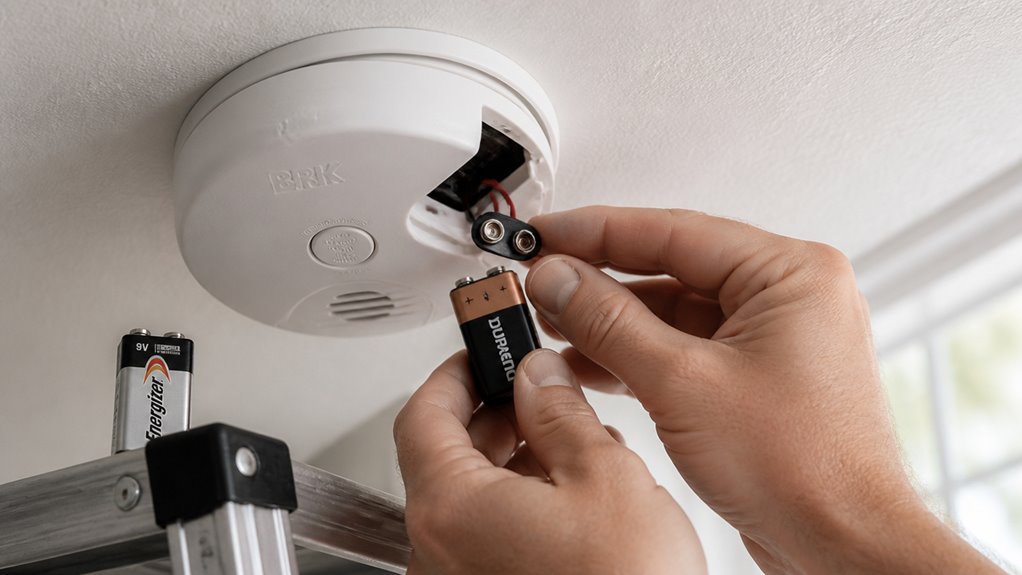

To change your BRK smoke alarm battery, first turn off power if it’s hardwired.
Open the battery compartment, usually on the back or side, then remove the old approved batteries carefully without mixing types or brands.
Install the correct replacement batteries (two AA or one 9V, depending on your model), ensuring proper polarity.
Close the compartment firmly, restore power if needed, and press the test button to confirm it’s working.
For tips on extending battery life and avoiding common mistakes, keep exploring.
Key Takeaways
- Power off the alarm by switching off the breaker for hardwired BRK models before accessing the battery compartment.
- Open the battery compartment by unlatching or twisting the alarm counterclockwise to access AA or 9V batteries.
- Remove old batteries carefully, avoiding terminal bending, and insert BRK-approved batteries matching the correct polarity.
- Close the battery compartment securely and restore power if hardwired, then press the Test button to verify functionality.
- Replace batteries immediately upon low-battery chirp and test the alarm monthly to ensure proper operation.
Identify Your BRK Smoke Alarm Battery Type
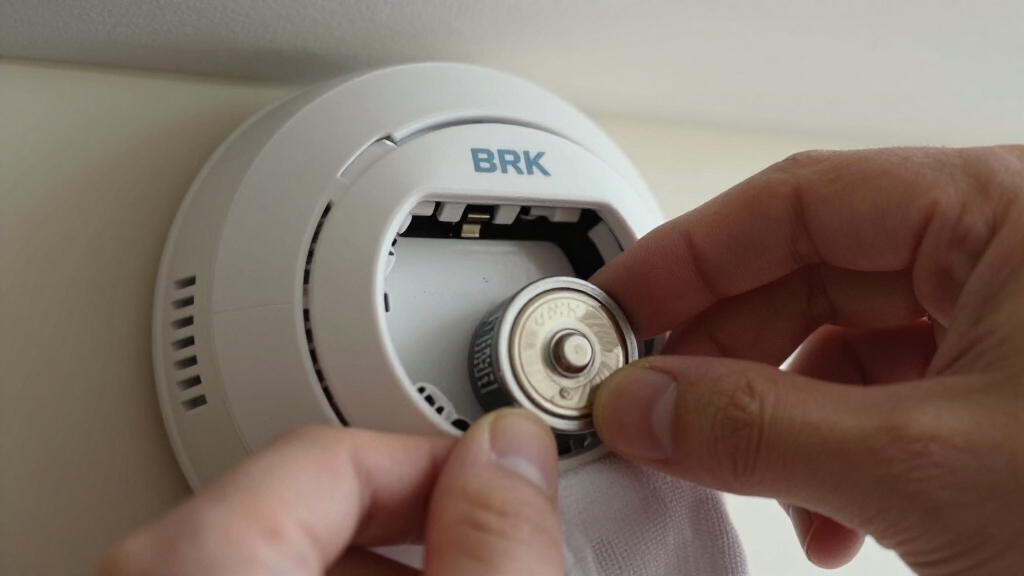
To identify your BRK smoke alarm battery type, start by checking the model’s battery compartment or manual for specific information.
Begin by inspecting your BRK smoke alarm’s battery compartment or manual to determine the correct battery type.
Most BRK battery-backup smoke alarms use two standard AA batteries, while some models run on a single 9V battery.
It’s important to use only the battery types listed by BRK for your specific alarm to guarantee proper function.
For AA batteries, acceptable replacements include Energizer E91 and Duracell MN1500/LR6.
If your alarm uses a 9V battery, look for Eveready/Energizer 522 or Duracell MN1604/MX1604 equivalents.
You’ll find exact battery requirements either inside the battery compartment or in the user manual.
Using the correct battery type helps maintain reliable alarm performance and safety.
BRK recommends verifying the specific backup battery requirements as some listings mention different voltage configurations.
When to Replace Your BRK Smoke Alarm Battery?
Knowing the right battery type for your BRK smoke alarm is just the first step in keeping it working properly. You need to replace the battery as soon as you hear the low-battery warning, usually a chirp or beep occurring every 45 seconds.
Don’t ignore these signals, as the battery can fail within 30 days after the warning starts.
Here are key signs to replace your BRK smoke alarm battery:
- A consistent chirp or beep indicating low power
- Reduced alarm sensitivity or no response during testing
- Alarms reaching the end of their recommended battery life cycle
Replacing the battery promptly guarantees ongoing protection and prevents false alarms or total failure of your smoke alarm. Kidde and BRK recommend changing 9V batteries every six months or immediately after the low-battery chirp to ensure reliable operation.
Choose the Right BRK Replacement Batteries
When it comes to your BRK smoke alarm, it’s super important to use the right kind of batteries.
You definitely want to stick to the approved battery types mentioned in your model’s guidelines. Some models use AA batteries, while others need a 9V replacement.
By choosing the recommended batteries, you ensure everything works smoothly and keeps you safe.
Many BRK models now feature sealed 10-year lithium batteries that reduce the need for frequent battery changes and ensure long-lasting protection.
Approved Battery Types
Although it might be tempting to grab any battery on hand, choosing the right replacement batteries for your BRK smoke alarm is critical to guarantee reliable operation.
Using approved batteries secures your alarm functions properly and alerts you during emergencies.
BRK smoke alarms typically require either AA or 9V batteries, but only specific models are recommended for each unit.
Here are the approved types you should consider:
For AA batteries: Energizer E91 and Duracell MN1500/LR6.
For 9V batteries: Eveready/Energizer 522 and Duracell MN1604/MX1604.
Always use batteries listed by BRK for your exact alarm model to avoid malfunctions.
Selecting the right battery type not only maintains safety but also extends the life of your smoke alarm.
Integrated 10-year non-removable batteries in newer models eliminate the need for periodic replacements, ensuring continuous protection.
Battery Compatibility Guidelines
Choosing the right replacement batteries for your BRK smoke alarm goes beyond just picking the correct size or brand. You need to use only the batteries listed by BRK for your specific model to guarantee safe, reliable operation.
For battery-backup models, BRK commonly approves AA batteries like Energizer E91 or Duracell MN1500/LR6. If your unit uses a single 9V battery, opt for approved types such as Eveready/Energizer 522 or Duracell MN1604.
Avoid unlisted or generic batteries, as they might cause malfunction or void product support. Always check your alarm’s manual or label for exact battery requirements.
Using compatible batteries helps maintain proper voltage and ensures the low-battery warning functions correctly, keeping your smoke alarm ready to protect your home.
For optimal performance, avoid mixing old and new batteries or different brands to reduce the risk of battery leakage and unexpected failures.
Remove Old Batteries From Your BRK Alarm Safely
Before you dive into removing those old batteries, it’s a good idea to power off your BRK alarm first. This helps prevent any electrical hiccups while you’re working.
Next, take a moment to locate the battery compartment. It’s usually pretty straightforward, but make sure to follow the instructions specific to your model.
Once you’ve found it, grab the right tools—like a small screwdriver if necessary—to help you safely remove the batteries. Just take your time so you don’t accidentally damage the unit.
For optimal safety, remember that some models use replaceable batteries that should be changed annually to maintain proper operation.
Power Off Before Removal
When you’re ready to replace the batteries in your BRK smoke alarm, make sure to turn off the power first, especially if you’re working with a hardwired model. This step prevents electrical shock and protects the alarm’s circuitry during battery removal. For hardwired units, switch off the breaker or fuse controlling the alarm’s power.
Follow these key safety tips before removing batteries:
- Confirm power is off by testing the alarm’s silence or test button.
- Use a sturdy ladder to reach the alarm securely without risking a fall.
- Avoid touching wiring or terminals to prevent damage or injury.
Taking these precautions guarantees you safely remove old batteries without compromising your BRK smoke alarm’s integrity or your own safety. Always remember to turn off the circuit breaker and verify wires are de-energized before beginning any work.
Locate Battery Compartment
To begin removing old batteries from your BRK smoke alarm, locate the battery compartment on the unit.
Typically, it’s on the back or side of the alarm and may be secured with a small latch or cover.
For some models, you might need to twist the alarm counterclockwise to access the compartment.
Identify whether your alarm uses AA batteries or a 9V battery by checking the label or manual.
Make sure you have good lighting to clearly see the compartment and avoid damaging the unit.
Before opening, confirm the power is off to prevent electrical issues.
Once you find the compartment, press the release tabs or gently lift the cover to expose the batteries, preparing you to safely remove the old ones.
Always confirm the breaker is off and verify with a voltage tester before handling the unit to ensure safety.
Use Proper Battery Tools
After you’ve located and opened the battery compartment, gather the proper tools to safely remove the old batteries from your BRK smoke alarm. Using the right tools prevents damage to the unit and guarantees your safety. Avoid using metal objects that could short the terminals.
Essential tools include:
- A small flathead screwdriver or plastic pry tool to gently release battery clips.
- A pair of needle-nose pliers for gripping and removing stubborn batteries.
- A clean cloth or gloves to handle batteries and avoid skin contact with corrosion.
These tools help you carefully detach batteries without bending terminals or causing sparks. Once removed, dispose of batteries according to local regulations. Proper tools make the replacement process smoother and protect your smoke alarm’s functionality. It is important to avoid mixing old and new batteries to ensure reliable operation of your smoke detector.
Install New Batteries Correctly in Your BRK Alarm
Although replacing batteries might seem straightforward, installing new batteries correctly in your BRK alarm is essential for its reliable operation.
First, identify the correct battery type for your model: either two AA batteries or a single 9V battery. Use only BRK-approved brands like Energizer or Duracell.
Open the battery compartment and remove the old batteries by pressing the release tabs.
When inserting new batteries, align the positive (+) and negative (–) terminals exactly with the markings inside the compartment.
Make certain each battery snaps securely into place to maintain proper contact.
Finally, close the battery compartment firmly.
Taking these precise steps prevents malfunctions and ensures your alarm remains ready to detect smoke effectively, keeping your home safe.
Remember to test your alarm monthly to confirm proper operation and replace batteries at least every six months.
Test Your BRK Smoke Alarm After Replacing Batteries
Testing your BRK smoke alarm right after replacing the batteries confirms that the unit is functioning correctly and ready to protect your home.
Once you’ve inserted the new batteries, press the Test/Silence button to initiate the alarm sound. This quick test guarantees proper battery seating and terminal alignment.
When testing your alarm, keep these points in mind:
The alarm should emit a loud, continuous sound indicating full functionality.
If the alarm doesn’t sound, recheck battery placement and try again before closing the compartment.
Always test before relocking the battery compartment if it has a locking mechanism to avoid future issues.
Performing this test immediately helps maintain reliable operation and peace of mind.
Replace Batteries in Hardwired BRK Smoke Alarms
Ensuring your hardwired BRK smoke alarm stays powered means you’ll need to replace its backup batteries periodically.
First, switch off AC power at the breaker to avoid electrical hazards.
Next, carefully remove the alarm from its mounting bracket to access the battery compartment.
Depending on your model, you may find either AA or 9V batteries.
Use only BRK-approved replacements like Energizer E91 or Duracell MN1500 for AA, and Eveready 522 or Duracell MN1604 for 9V.
Open the compartment, press release tabs, and remove old batteries.
Install new ones, matching terminals precisely, then close the compartment securely.
Finally, reattach the alarm, restore AC power, and test the unit using the Test/Silence button to confirm proper operation before completing the process.
How to Extend Your BRK Smoke Alarm Battery Life?
Regularly maintaining your BRK smoke alarm can materially extend its battery life. This helps you avoid frequent replacements and ensures continuous protection.
To maximize battery longevity, follow these key practices:
Use only BRK-approved battery types such as Energizer E91 or Duracell MN1500 for AA models. For 9V models, use Eveready/Energizer 522 or Duracell MN1604 to guarantee peak performance.
Test your alarm monthly using the Test/Silence button to confirm proper battery contact and function. This prevents unnoticed battery drainage.
Keep the alarm and its battery compartment clean and free of dust or debris. This can cause false alarms and unnecessary power consumption.
Common BRK Battery Replacement Mistakes to Avoid
Although replacing your BRK smoke alarm battery seems straightforward, several common mistakes can undermine the alarm’s reliability and safety.
First, don’t use unapproved battery types; always select the exact AA or 9V batteries listed by BRK to ensure proper performance.
Second, avoid inserting batteries with reversed terminals. Check polarity carefully to prevent malfunction.
Third, don’t ignore the low-battery warning; replace batteries immediately when the alarm chirps.
Fourth, skip testing the alarm after replacement at your own risk. Always press the Test button to verify correct installation.
Finally, if you have a hardwired unit, remember to cut AC power before servicing. Securely reinstall the alarm afterward.
Avoiding these errors keeps your smoke alarm functioning effectively and protects your home.
Frequently Asked Questions
Can I Use Rechargeable Batteries in My BRK Smoke Alarm?
You shouldn’t use rechargeable batteries in your BRK smoke alarm.
BRK specifically recommends using only listed battery types like Energizer E91 or Duracell MN1500 for AA models and approved 9V batteries for others.
Rechargeable batteries may not provide consistent voltage, causing false alarms or failure to work properly.
To keep your alarm reliable and safe, stick to the manufacturer-approved battery types and replace them promptly when the low-battery warning sounds.
How Do I Reset the Alarm After Battery Replacement?
They say, “A stitch in time saves nine,” so don’t delay resetting your BRK smoke alarm after replacing the battery.
To reset it, press and hold the Test/Silence button for about 15-20 seconds until the alarm stops chirping or beeping. This clears any low-battery alerts.
Then, test the alarm again using the same button to make certain it’s fully operational before closing the compartment or reinstalling the unit.
What Should I Do if the Alarm Keeps Chirping After Replacing Batteries?
If your BRK alarm keeps chirping after battery replacement, first double-check the battery terminals are correctly aligned and fully seated.
Make sure you’re using the approved battery type listed for your model.
Press the Test/Silence button to reset the unit.
If chirping continues, inspect for dust or debris in the compartment or consider replacing the entire alarm if it’s beyond its 10-year lifespan.
Always test the alarm to confirm functionality afterward.
Are There Specific Disposal Instructions for Used BRK Smoke Alarm Batteries?
Yes, you should dispose of used BRK smoke alarm batteries responsibly.
Don’t toss them in regular trash since batteries can leak harmful chemicals.
Instead, take them to a local battery recycling center or a hazardous waste collection site.
Many retailers also offer battery drop-off points.
Check your area’s specific disposal guidelines to comply with local regulations and protect the environment.
Proper disposal helps reduce pollution and supports safety.
How Do I Know if My BRK Smoke Alarm Is a 10-Year Sealed Unit?
You can tell if your BRK smoke alarm is a 10-year sealed unit by checking the label or manual for a “10-year sealed battery” or “no battery replacement required” note.
The model number often indicates this feature.
These units are designed to last 10 years without battery changes.
If you spot no battery compartment or warning chirps for low battery, it’s likely a sealed unit.
Always verify with official documentation.
Final Answer: How to Change Battery for BRK Smoke Alarm
Changing your BRK battery is a simple step to secure safety.
Stay sharp and select the suitable battery, swiftly swap the old for new, and soundly test your smoke alarm.
Skip sluggish steps and steer clear of common slip-ups to sustain strong, steady protection.
By being proactive and precise, you’ll preserve peace of mind and prevent potential problems.
Keep your BRK smoke alarm powered and performing perfectly because safety starts with smart, simple swaps.